|
Hi [FIRST.NAME],
Welcome to the iolo affiliate newsletter for June. In
the
last edition of the affiliate newsletter
we gave you the great news that System Mechanic 14 has
once again been featured as PCMag.com's 'Editors'
Choice'. [System Mechanic 14 is also ranked as #1 in
'The
Best Tune-Up Utilities'!]
In this edition of the newsletter
we're going to cover the following items:
-
Massive 70% off coupon on both System Mechanic 14
and System Mechanic 14 Pro for Father's Day.
-
iolo article; "More Computer Speed Awaits with
Windows Power Switching".
-
iolo Affiliate Masterclass; "How to Repurpose Your
Content with Great Results".

First off, to help you with your promotion for
System Mechanic® 14.5
and/or
System Mechanic 14.5 Professional®,
we've got a Father's Day deal that
should seriously
spike sales volume/conversion rates!
Through
the coupon below, your traffic/visitors can get a
massive 70% off either System Mechanic 14.5, or
System Mechanic 14.5 Professional.
That's a discount of $34.97 or $48.97 respectively!
|
Coupon Deal:
Get a massive 70% off either System Mechanic 14.5, or
System Mechanic 14.5 Pro. Coupon code: FATHERSDAY
Coupon Code:
FATHERSDAY
Valid From: June 20, 2015
Valid To: June 30, 2015 |
|
<a href="http://click.linksynergy.com/fs-bin/click?id=[SITE.CODE]&offerid=258005.10000168&type=3&subid=0"
>Get a massive 70% off either System Mechanic 14.5, or
System Mechanic 14.5 Pro. Coupon code: FATHERSDAY</a><IMG
border=0 width=1 height=1 src="http://ad.linksynergy.com/fs-bin/show?id=[SITE.CODE]&bids=258005.10000168&type=3&subid=0"
> |
More Computer
Speed Awaits with Windows Power Switching
 How
to Adjust Settings in Real Time for Maximum Performance How
to Adjust Settings in Real Time for Maximum Performance
Windows defaults your computer's power plan to a "Balanced"
setting. This means it tries to conserve power without
compromising system speed, but the unhappy result is that
neither is really achieved. A better way is to go full
throttle precisely when you need to and scale back at less
system-taxing times when you want to save power.
Enter PowerSense™, technology that customizes your PC's
power, processor and other settings to adapt to your changing
needs for system speed or stamina. PowerSense comes with
built-in modes that trigger automatically when System Mechanic®
detects the launch of specific programs. These modes are finely
tuned improvements over the Windows Balanced, Power Saver and
High Performance power plans. Here we'll look at them in detail,
and in a future article we'll walk through how to custom build
your own.
Better Than Balanced
If you are in Windows Balanced mode right now, half of
your processor cores may be completely parked, even
if you are running demanding software that could greatly
benefit from more core power. In addition, some programs
are designed such that they swallow up a single core,
leaving others untouched. This makes it important not
only to awaken additional cores for ancillary tasks, but
to run the active cores at full speed. Yet underclocking
is another problem with Balanced mode. The cores that
do remain on may be running at half speed or even less.
In high-demand situations like online gaming or video
editing, all of this squandered potential can result in
frustrating system lag, such as game play stutter,
low-resolution video streaming, and sluggish or "sticky"
mouse and keyboard responsiveness.
Right at the start of an intense gaming, editing, or
graphic design session, PowerSense takes you out of
the middling Balanced power plan and makes a series of
performance enhancing adjustments to help meet your
needs immediately.
The built-in modes in PowerSense tooled for maximum
system speed are based on an iolo Labs custom-built
power plan called Ultra Performance, and it
outperforms not just Balanced mode but even the Windows
High Performance plan.
Unlike the Windows High Performance power plan,
System Mechanic Ultra Performance:
-
Engages all processor cores
-
Revs all cores to the highest clock speed
-
Turns off non-essential processes for maximum system speed
and power
System Mechanic
Endurance, on the other hand, is specifically
designed for browsing or reading in a mobile,
battery-dependent situation, as this power mode:
-
Parks most processor
cores and scales them back to 25% of maximum speed
-
Reduces screen
brightness to 60% of full brightness
-
Turns off the hard
drive after five idle minutes
-
Scales back certain
display functions, including some mouse "preview" rollover
features
The Built-In Modes
Variations of Ultra Performance and Endurance modes ship
with System Mechanic and are custom-suited for the
following scenarios:
Gaming
Engages whenever the Steam gaming platform is launched,
as well as the Ubisoft and Uplay launchers
Music/Video Production
Engages whenever one of dozens of popular video or music
production programs launch, including Sony Acid Music
Studio, Sound Forge and Vegas, Pro Tools, Avid, Reason,
Tracktion, Reaper, Premiere, After Effects and more.
Graphic/3D/CAD Design
Engages whenever common graphic design programs launch,
including Adobe Illustrator, Photoshop, Rave and
Prelude, Paint Shop, Maya 3D, Designer Pro, Mudbox,
Poser Pro, ZBrush, Cinema 4D, LibreCAD 2D, Inventor 3D,
EdgeCam and more.
Programming
Engages whenever one of 12 programming applications
launch, including Miscrosoft Visual Studio, Lazarus,
Delphi Desktop, Cross Compiler and Command Line
Compiler, Code Composer, Netbeans Java, Perforce Visual
Client, MadCap Flare and more.
Maximize Battery
This mode adopts the custom power saving settings from
System Mechanic Endurance so you can preserve battery
life whenever full processor power is not required.
Office Productivity
Engages whenever Miscrosoft Word, Excel or PowerPoint
are launched.
Web Browsing
Engages whenever popular web browsers are launched,
including Chrome, Firefox and Internet Explorer
These custom modes trigger whenever you launch a trigger
app such as a video editing program or gaming client.
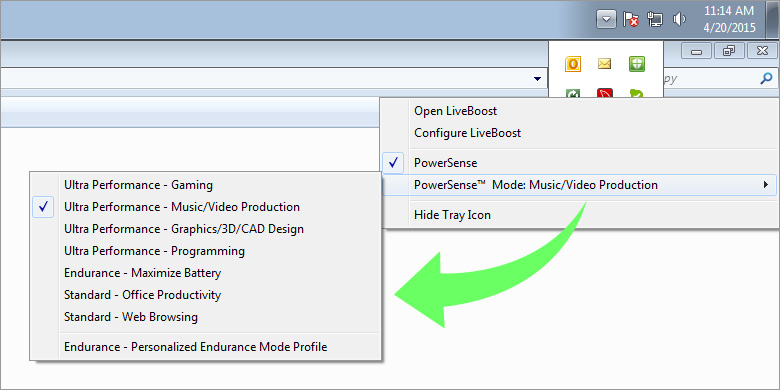
Additionally, if you have
enabled the PowerSense system tray icon, you can
manually toggle PowerSense modes right from the desktop.
To manually switch modes right from your desktop:
-
Click the
PowerSense system tray icon.
-
A checkmark
indicates PowerSense is properly enabled.
-
Run your cursor over the current built-in mode
to see the full list of available modes.
-
Select one of seven different built-in modes.
The system tray icon will change color
accordingly.
|
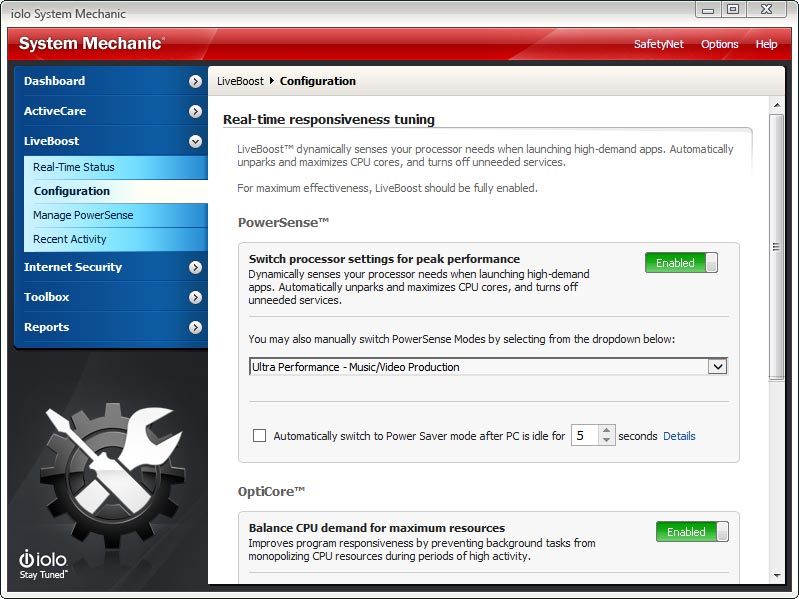
To manually switch modes from within System Mechanic:
-
In System Mechanic, click LiveBoost and
choose Configuration.
-
Be sure PowerSense is set to Enabled.
-
Click the down arrow in the PowerSense
dropdown menu.
-
Select one of seven different built-in modes. If
enabled, the system tray icon will change
color accordingly.
 |
Don't see your favorite task-specific software in any of
the trigger program lists? Want to enter Gaming mode
when you launch a specific desktop game that you own?
See how you can easily
create your own customized versions of PowerSense modes
here.
If you have any questions/comments on the above, please email
me.
iolo Affiliate
Masterclass
How to Repurpose Your Content with Great
Results
Performance Marketing Insider recently ran an
extremely useful article on how to take existing content, and find a way to use it again. Below is
a section from the article.
Everyone knows that 'content is king' for driving traffic
to your website. Great content brings people in due to
SEO perks, social sharing and much more. Unlike in years
past, however, the content actually has to be good in
order to benefit your site. This means many marketers
are spending a considerable amount of their time or a
considerable amount of their budget on hiring content
producers (trust me, I'm a freelance writer and MANY
sites hire me to create the content they need).
While it is always going to be necessary to have a good
stream fresh, new content, that doesn't mean that each
piece of content that is published has to remain just as
it is. Good marketers should learn the art of
'repurposing' content to get as much value out of it as
possible. Repurposing content is when you take existing
content and find a way to use it again. The trick is to
be able to do this without it becoming spammy or lower
quality.
Take note, repurposing content is NOT just spinning
content!
Take a look at the following great ways you can
repurpose your content to get the most value out of it
that you can. This repurposing typically takes much less
time and effort than creating new content and you can
even have an assistant take care of it for you.
Tweet the Content
This is one of the easiest options for repurposing
content. Simply pull all the key stats or facts out of
any content you publish and turn them into tweets.
Include a link back to your main post and you'll have an
easy way to engage with your audience while driving
traffic without having to come up with original content
ideas. (These stats can also make great Facebook posts!)
To continue reading the article,
please
click here.
If you have any questions/comments on the above, please email
me.
iolo's
Products are Available Through a Full Product Data Feed
Do you offer price shopping comparison tools to your
consumers? Would you like to receive a data feed of
iolo's products? If so, then please
email me.
Product Bundle: System Mechanic 14.5 PLUS Search and
Recover. Only $39.95 [Save $49.95!]
We're pleased to announce an exclusive offer just for
affiliates. You can now offer your customers a bundle of
the following products:
1.
System Mechanic 14.5 [Regular price: $49.95]
Everything you need to fix and speed Up Your PC.
2.
Search and Recover. [Regular price: $39.95]
Rescues accidentally deleted files, photos, MP3's & more.
Great news: through the link below your customers can purchase
both titles for only $39.95! This means that they'll save a
massive $49.95.
Check
out a selection of banners for this campaign you should consider
adding to your website/blog:
|
 |
|
<a href="http://click.linksynergy.com/fs-bin/click?id=[SITE.CODE]&offerid=163695.10000042&subid=0&type=4"><IMG
border="0" alt="Iolo technologies, LLC " src="http://ad.linksynergy.com/fs-bin/show?id=[SITE.CODE]&bids=163695.10000042&subid=0&type=4&gridnum=14"></a> |
| |
|
 |
|
<a href="http://click.linksynergy.com/fs-bin/click?id=[SITE.CODE]&offerid=163695.10000043&subid=0&type=4"><IMG
border="0" alt="Iolo technologies, LLC " src="http://ad.linksynergy.com/fs-bin/show?id=[SITE.CODE]&bids=163695.10000043&subid=0&type=4&gridnum=13"></a> |
| |
|
 |
| |
|
<a
href="http://click.linksynergy.com/fs-bin/click?id=[SITE.CODE]&offerid=163695.10000044&subid=0&type=4"><IMG
border="0" alt="Iolo technologies, LLC "
src="http://ad.linksynergy.com/fs-bin/show?id=[SITE.CODE]&bids=163695.10000044&subid=0&type=4&gridnum=1"></a> |
There are lots more banner sizes available for this campaign
through Linkshare. If you have any size requests, or
feedback, for the banners above please
email me.
Add Promotional Videos To
Your Website/Blog
Would you like to add high quality videos that promote
iolo's products to your website [in less than 2
minutes]? Now you can! Check out the links below:
Welcome to the iolo Technologies YouTube Channel
System Mechanic Waiting
Surviving the "Xpocalypse" - End of Windows XP Support
System Mechanic's Program Accelerator™
iolo Labs Educational Series - LiveBoost™
Turbocharge Your PC
Causes of PC Slowdown
Speed up your PC with System Mechanic®
Speed Up Your PC - Run Like New Again!
Top Ten Reviews: System Mechanic 11 Review
System Mechanic is featured on CBS for 'Clean Your Computer Day'
System Mechanic Promotional Video
Please note:
In order to add the videos to your website/blog, follow the
steps below:
1. Click on the "Share" button
underneath the YouTube video
player.
2. Click on the "Embed" button
above the YouTube URL.
3. Copy and paste the resulting
code where you want the video to
display on your website/blog.
Calling All Email Marketers!
If you
have a list that you think might be interested in iolo's
software I'd like to speak with you! We have a lot of [tested
and proven] messages that can be used by email marketers through
their lists. Email me
for more details.
What Customers Are Saying...

Here're a Handful of Reasons Why
You Should Work With Us:
-
High Conversion Rate. We convert your traffic! iolo's
respected brand, high quality software, low price point and
great value results in a conversion rate that averages 3%
across all earning affiliates. [Our top affiliates convert
at over 5%].
-
High Commission Rate: We'll pay you 40% on each and
every sale you make through the iolo affiliate program.
-
Trusted Program Management. iolo's
affiliate program is run through the Linkshare network and
professionally managed by
AMWSO.
-
45 Day Cookie. The customers you
refer to us don't have to buy right away for you to profit.
We have a 45 day tracking cookie so even if they return to
our website and purchase weeks after visiting through your
site we'll still pay you.
-
Monthly Newsletter Support. As an
iolo affiliate you'll receive an informative monthly email
that will give you the tools/resources to better market
iolo's software. We'll also keep you updated on affiliate
competitions, activation bonuses, program updates etc.
-
Keyword Support for CPC Campaigns.
iolo offers affiliates full support for paid search
campaigns.
Email me for a full keyword list.
-
Parasite Free Program. As with all
AMWSO managed programs the iolo affiliate program is
parasite free, and always will be.
-
High Quality Content. iolo offers
affiliates high quality content that can be used for Web and
Email Marketing.
Email me for more information.
Have
a great day!
James D. Nardell
iolo Affiliate Management Team
Email:
James.Nardell@iolo.com
Phone: (805) 624-5669
IM -
JamesNardell@hotmail.com [MSN Messenger]
IM -
JamesNardell@gmail.com [Google Talk]
vCard:
JamesNardell.com
http://www.iolo.com |
iolo Website
http://www.amwso.com/iolo.php | Affiliate Support
Website
|

