Welcome to the iolo affiliate newsletter for October. In the
last edition of the affiliate newsletter
we provided you with a
HTML Mailer; "How LiveBoost Shatters the Old Ceiling
on PC Performance Gains".
In this edition of the newsletter
we're going to provide you with a number of resources
which should help you better sell our software:

First off, to help you with your promotion for
System Mechanic® 14
and/or
System Mechanic 14 Professional®,
we've got a deal that your customers will
want to see!
Through
this landing page, your traffic/visitors can either get 50% off
System Mechanic 14, or purchase
System Mechanic 14 Professional for just $5 more i.e.
$29.95. [FYI This title usually retails for $69.95, so
this is a
huge
discount].
System Mechanic
Business: A Background
Before we get started, please note that the Average Order Value for
System Mechanic Business is:
$158.00
[for a 1 year subscription, good for 10 PCs]. One other
thing to bear in mind; some System Mechanic Business
orders can be very large…We very recently closed an
order for 60 PCs on a 3-year service plan. To learn
about standard pricing for System Mechanic Business [we
also run promotions on this product like for other
titles] please check out this matrix:
|
Product |
$ per PC
[Min 3 - 25 PC’s] |
$ per PC
[25+ PC's] |
|
System Mechanic Business - 1 year Service |
$15.80 |
$12.90 |
|
System Mechanic Business - 2 year Service |
$23.70 |
$19.35 |
|
System Mechanic Business - 3 year Service |
$31.28 |
$25.54 |
What System Mechanic will do for a company's PCs:
-
Speed up Windows start times - so staff can get
going faster.
-
Increase available memory - so PCs can do more
things faster at the same time [like having many
more documents, spreadsheets, and emails open at the
same time].
-
Increase available processor power - so that those
powerful processors are unleashed again, and
everything is just snappier.
What System Mechanic will do for a business:
-
Increase productivity and overall company production
by reducing delays.
-
Increase energy and fun by removing the frustration
and stress created by clogged PCs.
-
Increase revenue opportunities by increasing
responsiveness. No more; "I'll just handle it later,
my PC is busy loading that other spreadsheet."
-
Reduce the load on IT staff troubleshooting,
re-installing, manually cleaning and servicing PCs
when employees complain.
-
Prevent employees from asking for new computers.
Are your customers replacing PCs prematurely?
Many businesses mistakenly replace or upgrade PCs too
early:
-
When installing new software that runs too slowly.
-
After an arbitrary "lifecycle" period.
-
When staff rationalize about the impact on
productivity [who doesn’t like a new PC?]
Slowness is something most business owners just can’t
argue with, but savvy businesspeople know that any
investment requires proper maintenance to maximize its
useful life.
A System Mechanic TotalCare® tune up can revive your
customer's investment and keep those PCs running like
new - instead of buying new computers or wasting hours
of their IT department’s precious time, so the only time
they need to replace them is when they specifically
decide it’s time to do so.
Below are some articles on System Mechanic Business,
which further outline the product, what it can do and
how it works.
If you have any questions/comments on the above, please email
me.
System
Mechanic Business: Deploy Network-Wide Repairs
Can you use System Mechanic Business to fix and repair all
of your company’s computers at once?
The Network Deployment Tool in System Mechanic Business
allows you to configure ActiveCare® to run automatic
repairs on each and every one of your network PCs.
Easy-to-use distribution builder lets you configure
automated repair settings for all the PCs on your
business network when you set up and install the
program.
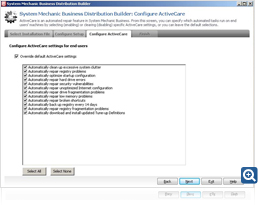 Create
and save customized repair settings
Create
and save customized repair settings
Use the Network Deployment manager to configure and
automatically push out selected ActiveCare settings to
all the PCs on your network.
-
Automatically clean up system clutter
-
Automatically repair registry problems
-
Automatically optimize startup
-
Automatically repair hard drive errors
-
Automatically repair broken shortcuts
-
Automatically repair low memory
-
And more...
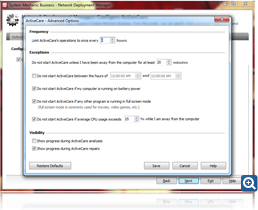 Advanced
options let you choose how frequently repairs will run
Advanced
options let you choose how frequently repairs will run
Advanced settings allow you to choose when and how often
to run ActiveCare repairs on your network PCs.
-
Run ActiveCare only during office hours
-
Pause ActiveCare if PCs are running on battery power
-
Pause ActiveCare of CPU usage exceeds a certain
percent
-
And more...
iolo Affiliate
Masterclass
10 SEO Tips
According to
Search Engine Watch below are 10 of the most common
missed SEO opportunities.
1. Google Authorship.
Often people write about the debate surrounding this tag
– is it or is it not helping with rankings? What is
often missed is the very basic concept that an image by
your result in the search engine increases your
click-through rates.
Don't add this tag everywhere. Make sure it is only on
well written, good content, but add it. Give your site
that extra lift.
2. Citations. Make sure wherever you list the
name of your business online (or where anyone else has
listed it) that everything in each one is the same as
the other. Meaning the name, phone number, contact,
address, etc. between all listings is the same, not
similar.
3. Content. Google likes specific content, so
keep topics clear and on point. Also make sure on
average your content is over 600 words per page or you
risk it being penalized as thin.
4. URLs. Make sure your site URLs are absolute
and not relative in your code. They shouldn't be too
long and contain multiple query parameters. If they need
to be rewritten, you have rewritten them.
5. The Alt Attribute. Use
this tag properly, but use it. It belongs on every
image on your site (sometimes it will be empty).
In the case of linking an image, the alt attribute acts
as though you added anchor text on a page. Don't stuff
this though; we have seen this as part of penalty
actions when that has been done.
Remember this is a tag for the blind. Treat it with
respect.
6. Page Speed. Check your site on the
Google Page Speed tool. Speed matters especially in
mobile. Get your site score above an 85-90.
7. Robots.txt. Your
robots.txt doesn't block your web page from being
indexed, only crawled. If you want to block a page from
being indexed, leave it off the robots.txt and add a
noindex tag.
8. Penalties. If you try to recover your site and
you fail the first time, get an expert to help you.
Google penalties are tricky subjects. You may not
know enough about penalty recovery to get your site out
of penalty status.
The longer your site stays penalized, the harder it will
be to recover your site. A site auditor will know what
to look for and how to communicate with Google in order
to get the best outcome.
9. New Sites. There is only one way to really
make sure Google won't find your new site: lock it down
with a login. Robots.txt don't prevent site indexing and
Google doesn't need a link to find you. If you don't
lock it down, don't be surprised when your new site is
indexed before you wanted.
10. Get a Site Audit Every Year. There are so
many new aspects of SEO in the past two years that it
can be very difficult for the average business owner to
keep up. Add to these changes the number of simple
penalties a site can receive and you can be quickly over
your head.
A yearly
site audit will help you avoid issues, avoid
penalties, and make sure you your site is running
smoothly. An SEO professional can also help you build
out strategies and assess missing income opportunities.
A good auditor is worth their weight in traffic,
conversions, and missed penalties. Just make sure you
aren't getting simple tools output and someone with real
knowledge and expertise.
If you have any questions/comments on the above, please email
me.
iolo's Products
are Available Through a Full Product Data Feed
Do you offer price shopping
comparison tools to your consumers? Would you like to
receive a data feed of iolo's products? If so, then
please
email me.
Product Bundle: System Mechanic 14 PLUS Search and
Recover. Only $39.95 [Save $49.95!]
We're pleased to announce an exclusive offer just for
affiliates. You can now offer your customers a bundle of
the following products:
1.
System Mechanic 14 [Regular price: $49.95]
Everything you need to fix and speed Up Your PC.
2.
Search and Recover. [Regular price: $39.95]
Rescues accidentally deleted files, photos, MP3's & more.
Great news: through the link below your customers can purchase
both titles for only $39.95! This means that they'll save a
massive $49.95.
Check
out a selection of banners for this campaign you should consider
adding to your website/blog:
|
 |
|
<a href="http://click.linksynergy.com/fs-bin/click?id=[SITE.CODE]&offerid=163695.10000042&subid=0&type=4"><IMG
border="0" alt="Iolo technologies, LLC " src="http://ad.linksynergy.com/fs-bin/show?id=[SITE.CODE]&bids=163695.10000042&subid=0&type=4&gridnum=14"></a> |
| |
|
 |
|
<a href="http://click.linksynergy.com/fs-bin/click?id=[SITE.CODE]&offerid=163695.10000043&subid=0&type=4"><IMG
border="0" alt="Iolo technologies, LLC " src="http://ad.linksynergy.com/fs-bin/show?id=[SITE.CODE]&bids=163695.10000043&subid=0&type=4&gridnum=13"></a> |
| |
|
 |
| |
|
<a href="http://click.linksynergy.com/fs-bin/click?id=[SITE.CODE]&offerid=163695.10000044&subid=0&type=4"><IMG
border="0" alt="Iolo technologies, LLC " src="http://ad.linksynergy.com/fs-bin/show?id=[SITE.CODE]&bids=163695.10000044&subid=0&type=4&gridnum=1"></a> |
There are lots more banner sizes available for this campaign
through Linkshare. If you have any size requests, or
feedback, for the banners above please
email me.
Add Promotional Videos To Your
Website/Blog
Would you like to add high quality videos that promote
iolo's products to your website [in less than 2
minutes]? Now you can! Check out the links below:
Welcome to the iolo Technologies YouTube Channel
Surviving the "Xpocalypse" - End of Windows XP Support
System Mechanic's Program Accelerator™
iolo Labs Educational Series - LiveBoost™
Turbocharge Your PC
Causes of PC Slowdown
Speed up your PC with System Mechanic®
Speed Up Your PC - Run Like New Again!
Top Ten Reviews: System Mechanic 11 Review
System Mechanic is featured on CBS for 'Clean Your Computer Day'
System Mechanic Promotional Video
Please note:
In order to add the videos to your website/blog, follow the
steps below:
1. Click on the "Share" button
underneath the YouTube video
player.
2. Click on the "Embed" button
above the YouTube URL.
3. Copy and paste the resulting
code where you want the video to
display on your website/blog.
Calling All Email Marketers!
If
you have a list that you think might be interested in iolo's
software I'd like to speak with you! We have a lot of [tested
and proven] messages that can be used by email marketers through
their lists. Email me
for more details.
What Customers Are Saying...

Here're a Handful of Reasons Why You
Should Work With Us:
- High
Conversion Rate. We convert your traffic! iolo's
respected brand, high quality software, low price point and
great value results in a conversion rate that averages 3%
across all earning affiliates. [Our top affiliates convert
at over 5%].
-
High Commission Rate: We'll pay you 30% on each and
every sale you make through the iolo affiliate program.
- Trusted Program Management. iolo's affiliate
program is run through the Linkshare network and
professionally managed by
AMWSO.
- 45 Day Cookie. The customers you refer to us don't
have to buy right away for you to profit. We have a 45 day
tracking cookie so even if they return to our website and
purchase weeks after visiting through your site we'll still
pay you.
- Monthly Newsletter Support. As an iolo affiliate
you'll receive an informative monthly email that will give
you the tools/resources to better market iolo's software.
We'll also keep you updated on affiliate competitions,
activation bonuses, program updates etc.
- Keyword Support for CPC Campaigns. iolo offers
affiliates full support for paid search campaigns.
Email me for a full keyword list.
- Parasite Free Program. As with all AMWSO managed
programs the iolo affiliate program is parasite free, and
always will be.
- High Quality Content. iolo offers affiliates high quality
content that can be used for Web and Email Marketing.
Email me for more information.
Have a great day!
James D. Nardell
iolo Affiliate Management Team
Email:
James.Nardell@iolo.com
Phone: (805) 624-5669
IM -
JamesNardell@hotmail.com [MSN Messenger]
IM -
JamesNardell@gmail.com [Google Talk]
vCard:
JamesNardell.com
http://www.iolo.com |
iolo Website
http://www.amwso.com/iolo.php | Affiliate Support
Website



