|
Hi [FIRST.NAME],
Welcome to the iolo affiliate newsletter for February. In
the
last edition of the affiliate newsletter
we introduced you to an article which outlined how
iolo's iPS [iolo
Premium Services] can protect customers against
Ransomware, malware, and much more.
In this edition of the newsletter
we're going to cover the following items:
-
iolo article; "System Mechanic® Performance
Benchmarking"
-
iolo Affiliate Masterclass; "3
Things Pay Per Call Affiliates Forget to Do When They
Finally Start Crushing It"

First off, to help you with your promotion for
System Mechanic® 16.5 and
System Mechanic 15.5 Professional®,
we've got a Valentine's Day deal that your customers will want to see!
They can get 60% off either of these titles [through to
February 28th] using the
coupon code
VDAY!
|
Coupon Deal:
Happy Valentine's
Day! Get 60% off System Mechanic Pro, or System
Mechanic. Coupon code: VDAY
Coupon Code:
VDAY
Valid From: Now
Valid To: February 28, 2016 |
|
<a href="http://click.linksynergy.com/fs-bin/click?id=[SITE.CODE]&offerid=365339.10000185&type=3&subid=0"
>Happy Valentine's Day! Get 60% off System Mechanic Pro,
or System Mechanic. Coupon code: VDAY</a><IMG border=0
width=1 height=1 src="http://ad.linksynergy.com/fs-bin/show?id=[SITE.CODE]&bids=365339.10000185&type=3&subid=0"
> |
Please note:
Feel free to use the copy/graphic below on your website/blog.
System Mechanic®
Performance Benchmarking
Purpose
To show computer performance improvement using iolo's System
Mechanic software to repair and optimize Windows PCs.
iolo technologies (iolo) recently released System Mechanic
v16.5.
-
Version 16.5 has been re-written from the ground up, with
every feature in the product re-engineered for improved
functionality and performance.
-
Includes new optimization features for Windows 10, designed
to increase privacy and reduce internet bandwidth demands.
This paper is the result of iolo Labs comprehensive and
reproducible benchmark testing, with results that users can
examine for themselves.
Tests were conducted that specifically showed performance
improvement of:
Methodology
-
Install commonly used programs (41) and browser
add-ons (6) to replicate an in-use PC, in a manner that is
reproducible and produces consistent results.
-
Installed software includes:
-
Security software, VPN software, PDF readers, gaming and
entertainment platforms, media players/editors,
productivity applications, etc.
-
Collect performance metrics on the reproduction of an
in-use PC before applying System Mechanic
-
Collect performance metrics on the reproduction of an
in-use PC after optimizing with System Mechanic
-
Run each test 5 times before and 5 times after System
Mechanic installation, remove the highest and lowest scores,
and then average the remaining 3 to calculate final scores.
-
Report improvements (in each test) after PCs have
been optimized.
Test Specifications
Hardware
|
Convertible Tablet |
Ultrabook |
OS:
Windows 8.1 (6.3.9600)
CPU: Intel Atom Z3745 @ 1.33Ghz
RAM: 2GB
Storage: 29GB Hynix HBG4e SSD
Graphics: Intel HD Graphics |
OS:
Windows 10.0.14393
CPU: Intel i53317U @ 1.7Ghz
RAM: 4GB
Storage: 341 GB HDD w/SSD cache
Graphics: Intel HD Graphics 4000 |
| |
|
|
Desktop |
Notebook |
OS:
Windows 10.0.14393
CPU: AMD FX8300 8-core @ 3.3Ghz
RAM: 16GB
Storage: OCZ Vertex 450 SSD (120GB)
Graphics: NVIDIA GeForce 8400GS |
OS:
Windows 7 (6.1.7600)
CPU: Intel U2300 @ 1.2 Ghz
RAM: 2GB
Storage: 112GB HDD
Graphics: Mobile Intel 4-series |
Software
Windows Event Logs
GeekBench 4 by Primate Labs
-
GeekBench is focused on testing the performance of CPUs. It
runs workloads that model real-world tasks (e.g., running
applications) in order to offer meaningful, real-world like,
results..
-
GeekBench is used by organizations to demonstrate the
processing capabilities of their products.
NovaBench 3 by Novawave Inc.
-
NovaBench tests the four primary components of a PC. On
completion, it scores the PC based on an aggregate sum, and
also offers individual scores for each component.
-
Its test perform floating point arithmetic, integer
arithmetic, and MD5 Hashing to evaluate CPU performance.
-
It tests graphics processing units (GPUs) for 3D Graphics,
RAM for read and write speed, and write speed of storage
devices.
PerformanceTest 9.0 by PassMark
Software
-
PerformanceTest evaluates the four primary components of a
PC, running 32 various sub-tests in the process.
-
To measure a CPU's capabilities it runs mathematical
operations, compression, encryption, and physics.
-
To measure graphic performance it tests vectors, bitmaps,
fonts, text, GUI elements, and DirectX 9 to DirectX 12 in 4K
resolution.
-
To measure drive performance it tests reading, writing &
seeking within disk files + IOPS.
-
It benchmarks access speeds and latency to system RAM.
Heaven 4.0 by Unigine Corp
-
Heaven Benchmark is a GPU benchmark program used to evaluate
graphic (i.e, gaming graphics) performance.
-
It stresses graphic cards to their limits to determine the
stability of a GPU under extreme conditions.
-
In addition to an overall score, it also measures Frames Per
Second (FPS).
Internet Benchmarking sites
System Mechanic (16.5.1.27)
To repair and optimize test PCs.
Windows Startup Time
Windows' Event Viewer (Applications and Service LogMicrosoft-Windows-Diagnostics-Performance/Operational,
Event ID100) was used to record boot-up times.
Startup (Windows Boot) Speed
Improvement (%) after running System Mechanic

Key Findings
-
Optimizing the PCs with System Mechanic
has a dramatic positive impact on the time to boot a Windows
PC.
-
For example, the Windows 10 Desktop
took 148.4 seconds to boot, but after running System
Mechanic the PC was up and running in 48.2 seconds – over
200% faster.
-
The total aggregate score (across all
PCs) for Startup Time was: 89.77% improved.
Internet Speed
Four popular download speed test websites were used to evaluate
the performance improvement on a system optimized with System
Mechanic.
A common browser was used to separately visit each site and run
their speed measurement tests.
Download Speed
Improvement (%) after running System Mechanic

Key Findings
-
Internet download speeds increased considerably across all
devices.
-
Each PC saw at least 14%+ improvements.
-
3 of 4 PCs realized over 20% faster downloads.
-
The total aggregate score (across all PCs) for Internet
Speed was: 39.25% improved.
CPU Performance
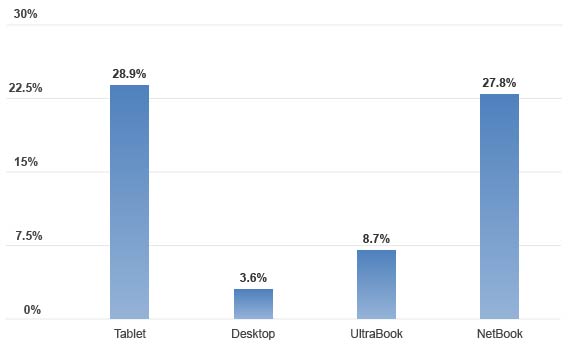
Benchmarking tools NovaBench, PerformanceTest, and GeekBench (2
separate tests – Single Core and Multicore) include CPU stress
tests in which they perform tasks such as compression,
encryption, floating point arithmetic, integer arithmetic, and
MD5 Hashing.
CPU Performance
Improvement (%) after running System Mechanic
Key Findings
-
The Desktop, with an 8-core processor,
realized modest 3.6% gains
-
The PCs with 2-4 cores had improvements
near 30%
-
The total aggregate score (across all
PCs) for CPU Performance was: 17.25% improved.
RAM Performance
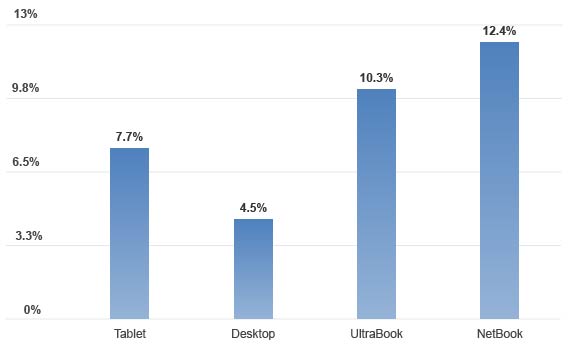
NovaBench and PerformanceTest offer RAM
benchmarking evaluations in which they measure latency, and read
and write speed to system memory.
RAM (Memory) Performance
Improvement (%) after running System
Mechanic
Key Findings
-
The Desktop with the most RAM (16GB)
realized the least benefit, but was still improved by 4.5%.
-
The PCs with 2-4GB of memory had
sizable increases in RAM performance directly related to
optimizations made by System Mechanic.
-
The total aggregate score (across all
PCs) for RAM Performance was: 8.73% improved.
GPU (Graphics)
Performance
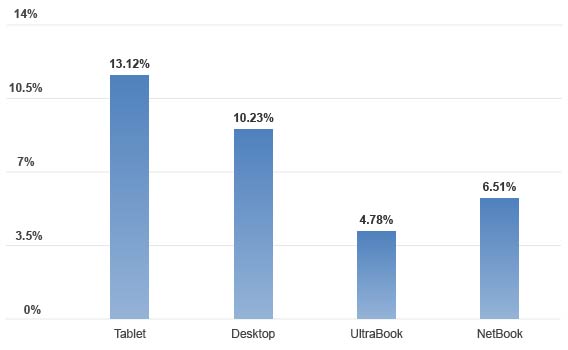
Heaven, NovaBench and PerformanceTest (2
separate tests – 2D and 3D) were aggregated for each platform
tested.
Heaven scores the system in
Frames-Per-Second (FPS), a popular measurement mechanism often
used by PC gamers.
PerformanceTest, in its two tests,
evaluates the graphic performance using tests that stress image
vectors, bitmaps, fonts, text, GUI elements (2D), and DirectX 9
to DirectX 12 in 4K resolution (3D).
Graphics (GPU) Performance
Improvement (%) after running System
Mechanic
Key Findings
Drive Performance
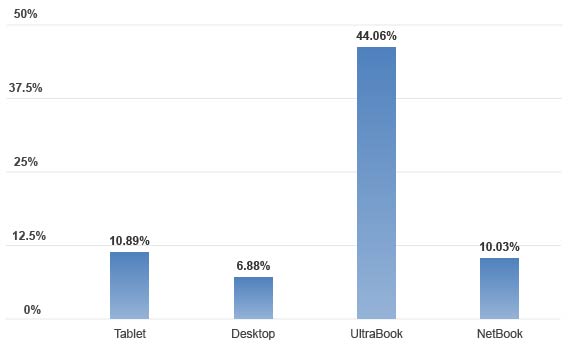
PerformanceTest and NovaBench measure drive
performance by testing read, write & seeks within disk files +
IOPS (Input-Output operations per second). Scores from the tools
were aggregated for each platform tested.
Drive (Primary Storage) Performance
Improvement (%) after running System
Mechanic
Key Findings
-
The Desktop has a high performance SSD
as the primary storage device, and therefore realized
limited improvement.
-
The UltraBook's HDD averaged
performance gains of over 44%. (This PC's SSD is used as a
cache, not a primary storage drive).
-
The lower performance SSD- and HDD-based
systems saw significant increases.
-
The total aggregate score (across all
PCs) for Drive Performance was: 17.97% improved.
Conclusion
-
System Mechanic v16.5 demonstrably
improves the performance of the four principal components of
a PC.
-
The improvements quantified by the
benchmarking software programs may deliver a faster PC with
enhanced performance during a potentially wide array of
tasks, including gaming, rendering, streaming, graphic
design, office tasks and more.
-
In addition to increased system
responsiveness, common user actions, including booting the
PC and web browsing, were improved considerably across all
systems tested.
REFERENCES
PC Mag:
Top10Reviews:
If you have any questions/comments on the above, please email
me.
iolo Affiliate
Masterclass
3 Things Pay Per Call Affiliates
Forget to Do When They Finally Start Crushing It.
This month we want to bring your attention to a recent
Performance Marketing Insider
article which
gives some must-read advice to Pay Per Call affiliates.
[This advice, in our opinion, is equally applicable to
other channels, such as paid search for example].
"As a pay per call marketer, the beginning stages
can feel like a grind, but eventually you will reach an
"Ah Ha" moment where you finally begin to really get it.
A big weight of anxiety begins to lift as you see the
profits start stacking up monthly as your campaigns
become optimized. The truth is that not everyone can
reach this level of success and end up giving up too
soon before they can experience this moment. In an
ever-changing technology landscape, being able to do
this everyday, and make a living at that, is quite the
accomplishment. When you finally start crushing it with
pay per call, remember these 3 tips that most people
completely overlook:
Anticipate Day to Day Fluctuations
There are good days and there are bad days. Campaigns
might have to be paused, your calls might drop due to a
flooded call center, or competitors might creep in to
drive up your average cost per call. Whatever the case,
experienced pay per call marketers are prepared. You
should consider looking for backup buyers and a diverse
source of traffic when things are going good so that it
isn't too big of a shock when things, inevitably, start
to go badly. You should also track your income and
profitability trends on a monthly basis to help even
things out in the event that you have a rough day or
week. Many people track this on a daily basis. This is
normal, but it could cause some unnecessary stress on a
bad day. Tracking your workload monthly will paint a
better picture as well as give you an idea of what you
can plan for the next month and the remainder of the
year.
Prepare for The Government's Cut
No one is immune from the government and its tax
requirements. What do you think is going to happen when
they send you request for payment and you reply with,
"Sorry, I spent it all at the Spearmint Rhino while at
the Affiliate Summit." The Government likes to get paid
first and not planning ahead for tax payments is the
single, biggest mistake that rookie publishers make.
Thus, take a lesson from those who have suffered the
consequences and do what is necessary to ensure you
won't go broke in the Spring. One piece of advice is
that you might want to consult with an accountant at
regular intervals throughout the year so that they may
guide you on a proper tax strategy. When I was a solo
pay per call marketer, I made sure to treat my operation
like an actual business. I opened up a business
checking/savings account and signed up for a business
credit card with cash rewards or airline miles – Adwords
and Facebook expenses can rack up credit card points
fast! Also, I never mixed my personal and business
accounts. All business expenses came out of my business
accounts and I made sure to include an explanation for
each transaction as this could be used as a defense
against any IRS audits. I hate to hear stories of pay
per call marketers who were making $20K+/month profit
only to end up broke come tax time because they didn't
plan for a big tax bill."
To continue reading the article, please
click here.
If
you have any questions/comments on the above, please email me.
iolo's
Products are Available Through a Full Product Data Feed
Do you offer price shopping comparison tools to your
consumers? Would you like to receive a data feed of
iolo's products? If so, then please
email me.
Product Bundle: System Mechanic 16.5 PLUS Search and
Recover. Only $39.95 [Save $49.95!]
We're pleased to announce an exclusive offer just for
affiliates. You can now offer your customers a bundle of
the following products:
1.
System Mechanic 16.5 [Regular price: $49.95]
Everything you need to fix and speed Up Your PC.
2.
Search and Recover. [Regular price: $39.95]
Rescues accidentally deleted files, photos, MP3's & more.
Great news: through the link below your customers can purchase
both titles for only $39.95! This means that they'll save a
massive $49.95.
Check
out a selection of banners for this campaign you should consider
adding to your website/blog:
|
 |
|
<a href="http://click.linksynergy.com/fs-bin/click?id=[SITE.CODE]&offerid=365339.10000042&subid=0&type=4"><IMG
border="0" alt="Iolo technologies, LLC " src="http://ad.linksynergy.com/fs-bin/show?id=[SITE.CODE]&bids=365339.10000042&subid=0&type=4&gridnum=14"></a> |
| |
|
 |
|
<a href="http://click.linksynergy.com/fs-bin/click?id=[SITE.CODE]&offerid=365339.10000043&subid=0&type=4"><IMG
border="0" alt="Iolo technologies, LLC " src="http://ad.linksynergy.com/fs-bin/show?id=[SITE.CODE]&bids=365339.10000043&subid=0&type=4&gridnum=13"></a> |
| |
|
 |
| |
|
<a
href="http://click.linksynergy.com/fs-bin/click?id=[SITE.CODE]&offerid=365339.10000044&subid=0&type=4"><IMG
border="0" alt="Iolo technologies, LLC "
src="http://ad.linksynergy.com/fs-bin/show?id=[SITE.CODE]&bids=365339.10000044&subid=0&type=4&gridnum=1"></a> |
There are lots more banner sizes available for this campaign
through Rakuten Linkshare. If you have any size requests, or
feedback, for the banners above please
email me.
Add Promotional Videos To
Your Website/Blog
Would you like to add high quality videos that promote
iolo's products to your website [in less than 2
minutes]? Now you can! Check out the links below:
Welcome to the iolo Technologies YouTube Channel
System Mechanic Waiting
Surviving the "Xpocalypse" - End of Windows XP Support
System Mechanic's Program Accelerator™
iolo Labs Educational Series - LiveBoost™
Turbocharge Your PC
Causes of PC Slowdown
Speed up your PC with System Mechanic®
Speed Up Your PC - Run Like New Again!
Top Ten Reviews: System Mechanic 11 Review
System Mechanic is featured on CBS for 'Clean Your Computer Day'
System Mechanic Promotional Video
Please note:
In order to add the videos to your website/blog, follow the
steps below:
1. Click on the "Share" button
underneath the YouTube video
player.
2. Click on the "Embed" button
above the YouTube URL.
3. Copy and paste the resulting
code where you want the video to
display on your website/blog.
Calling All Email Marketers!
If you
have a list that you think might be interested in iolo's
software I'd like to speak with you! We have a lot of [tested
and proven] messages that can be used by email marketers through
their lists. Email me
for more details.
What Customers Are Saying...

Here're a Handful of Reasons Why
You Should Work With Us:
-
High Conversion Rate. We convert your traffic! iolo's
respected brand, high quality software, low price point and
great value results in a conversion rate that averages 3%
across all earning affiliates. [Our top affiliates convert
at over 5%].
-
High Commission Rate: We'll pay you 40% on each and
every sale you make through the iolo affiliate program.
-
Trusted Program Management. iolo's
affiliate program is run through the Rakuten Linkshare network and
professionally managed by
AMWSO.
-
45 Day Cookie. The customers you
refer to us don't have to buy right away for you to profit.
We have a 45 day tracking cookie so even if they return to
our website and purchase weeks after visiting through your
site we'll still pay you.
-
Monthly Newsletter Support. As an
iolo affiliate you'll receive an informative monthly email
that will give you the tools/resources to better market
iolo's software. We'll also keep you updated on affiliate
competitions, activation bonuses, program updates etc.
-
Keyword Support for CPC Campaigns.
iolo offers affiliates full support for paid search
campaigns.
Email me for a full keyword list.
-
Parasite Free Program. As with all
AMWSO managed programs the iolo affiliate program is
parasite free, and always will be.
-
High Quality Content. iolo offers
affiliates high quality content that can be used for Web and
Email Marketing.
Email me for more information.
Have
a great day!
James D. Nardell
iolo Affiliate Management Team
Email:
James.Nardell@iolo.com
Phone: (805) 624-5669
IM - JamesNardell [Skype]
IM -
JamesNardell@gmail.com [Google Talk]
vCard:
JamesNardell.com
http://www.iolo.com |
iolo Website
http://www.amwso.com/iolo.php | Affiliate Support
Website
|

