|
Hi [FIRST.NAME],
Welcome to the iolo affiliate newsletter for December. In the
last edition of the affiliate newsletter
we provided you with holiday coupons for; Thanksgiving,
Black Friday and Cyber
Monday.
In this edition of the newsletter
we're going to provide you with a number of resources
which should help you effectively sell our software:
-
High-value end of year coupon; 60% off ALL iolo products.
Coupon code: NEWYEAR15.
-
Must read article; "The Truth About Your PC's Factory
Settings: One Size Fits None".
-
iolo Affiliate Masterclass;
"Buried Gems: 6 Important AdWords Reports You've
Never Heard Of".

End of Year Coupon
Below is the end of year coupon that gives 60% off ALL
iolo products i.e.
System Mechanic Pro,
System Mechanic,
System Shield,
Search and Recover and
DriveScrubber. This is another high-value coupon,
that likely won't be repeated for a good few months, so be sure to give
it
solid exposure on your website/blog.
|
Coupon Deal:
Get 60% off ALL iolo products. Coupon code: NEWYEAR15
Coupon Code:
NEWYEAR15
Valid From: December 1, 2014
Valid To: December 31, 2014 |
|
<a href="http://click.linksynergy.com/fs-bin/click?id=[SITE.CODE]&offerid=258005.10000153&type=3&subid=0"
>Get 60% off ALL iolo products. Coupon code:
NEWYEAR15</a><IMG border=0 width=1 height=1 src="http://ad.linksynergy.com/fs-bin/show?id=[SITE.CODE]&bids=258005.10000153&type=3&subid=0"
> |
Please note:
Feel free to use the copy/graphics below on your
website/blog.
The Truth About Your
PC's Factory Settings: One Size Fits None
 Even
a brand new, state-of-the-art computer was built for no
one in particular. Windows comes installed on your PC in
average ("Balanced") power mode. This means your
computer arrived trying to perform a balancing act
between users who want to save power and those who want
raw speed. The result is your new PC is constrained
by a mediocre system power setting that is a
detriment to overall PC responsiveness. Even
a brand new, state-of-the-art computer was built for no
one in particular. Windows comes installed on your PC in
average ("Balanced") power mode. This means your
computer arrived trying to perform a balancing act
between users who want to save power and those who want
raw speed. The result is your new PC is constrained
by a mediocre system power setting that is a
detriment to overall PC responsiveness.
In many ways, you're not using the processor power you
paid for. Because it defaults to Windows "Balanced"
mode, often half your PC's processor cores are parked or
running at half speed, even when needed. What if
half the cylinders in your car were mysteriously turned
off, so the engine couldn't deliver the power it was
designed to?
What if you could turn those cylinders on right when you
need them? iolo's engineers never thought of you as
average, so we created PowerSense™: Intelligent,
automated technology included with System Mechanic® that
takes you out of average power mode when it detects
the launch of high-demand apps.
 PowerSense
lets you automatically run at full speed right when
gaming, video editing or intense graphic design require
it, then automatically reverts to a more conservative
mode favoring endurance during times you step away or
your PC is idle. By automatically switching power modes
when it detects more processor power is necessary for
the task at hand, PowerSense ensures your system is
always performing at its best for you in real time. PowerSense
lets you automatically run at full speed right when
gaming, video editing or intense graphic design require
it, then automatically reverts to a more conservative
mode favoring endurance during times you step away or
your PC is idle. By automatically switching power modes
when it detects more processor power is necessary for
the task at hand, PowerSense ensures your system is
always performing at its best for you in real time.
Compare Windows default to PowerSense
The Windows default "Balanced" power plan is simply too
blunt an instrument, because it waits to scale processor
speed after it senses a demand for more processing
power—and that's too late! PowerSense, however, knows
to fully unleash all processor cores exactly when you
need them for the very best system response.
Furthermore, the Windows default "Balanced" power plan
does not optimize for low-power situations either,
because it reacts to a draining laptop battery only too
late, when life has already slipped below 15% and there
is not a lot of juice left to preserve anyway. By
contrast, PowerSense proactively and nimbly shifts
whenever it detects system stamina is what's called for,
as when in battery mode and running less
processor-hungry programs.
Discover what you've been missing with a well-tuned,
responsive PC that doesn't spoil precious battery life
and jumps to true full speed when it senses it's game
time.

PowerSense dynamically senses what
you're doing and
automatically commands your PC's resources to focus
there.
PowerSense includes the following:
Ultra Performance Mode is custom-designed to
exceed even the highest Windows power mode. When
PowerSense sees that you're playing a game, for example,
it will automatically go into Ultra Performance Mode,
engaging all processor cores at maximum clock speed,
jettisoning all non-essential background programs and
services, and flushing your RAM of any old and
unnecessary remnants.
Endurance Mode, on the other hand, reduces
battery consumption when the top priority is a
long-lasting mobile session, especially when writing,
reading or web browsing.
Variations of these PowerSense Modes are built
into LiveBoost, suited specifically to multimedia
editing, gaming, office multitasking, graphic design and
other popular activities that demand different degrees
of system speed and stamina. In a future article we'll
look in detail at PowerSense Modes, including how to
create, edit and save your own customized versions.
And finally, PowerSense automatically detects when your
PC is idle, and switches it into a power saving mode
after an interval you specify. This reduces overall
component wear-and-tear while also conserving battery
life for times you are away from a power outlet.
Goodbye sluggish defaults
Video streaming, email, web browsing, social media
messaging, webcam chats: In these multi-tab times, a
machine that doesn't know you will never keep up. And
then there are times we want full CPU power and memory
devoted to doing one thing well—intense activities like
gaming or content creation. By adding PowerSense
intelligence to LiveBoost's suite of real-time response
tuning features, System Mechanic introduces a completely
fresh approach to putting the best combination of
system resources at your fingertips, delivering a PC
that truly shadows you.
iolo Affiliate
Masterclass
Buried Gems: 6
Important AdWords Reports You've Never Heard Of
Search Engine Land recently ran a fascinating
article on often overlooked AdWords reports which can
help marketers uncover valuable "gems" of data. Below is
a section from the article.
Every paid search marketer has
their "pet" reports. Some are obsessed with quality
score, others with queries, and some chase sheer numbers
of active keywords.
Over the years, I've developed a set of "go to" reports
where I always find meaningful insights and account
improvements. You probably already know what some of
them are — the query report, the time of day report,
etc. — so I won't bore you with those. Instead, I'm
sharing 6 "hidden reports" that are underutilized by
almost all search marketers, largely because they are
buried and difficult to find.
When I audit an account, looking for problems or missed
opportunities, these are the places I look before I even
take a glance at the keywords. At least one of these
hidden reports never fails to provide
useful data or illuminate problems that somebody else
has overlooked. Beyond that, these 6 reports, when
combined, define the context of an account: the goals,
the problem areas, and the expectations.
So, whether you are looking for what somebody else
missed, troubleshooting an account problem, or simply
searching for some new inspiration, I advise you to
check out the 6 buried but important reports in AdWords
below.
The Report: Demographics On The
Display Network
Where to Find It: Shared Library > Audiences > and then
click into one of your existing Rule-Based remarketing
audiences.
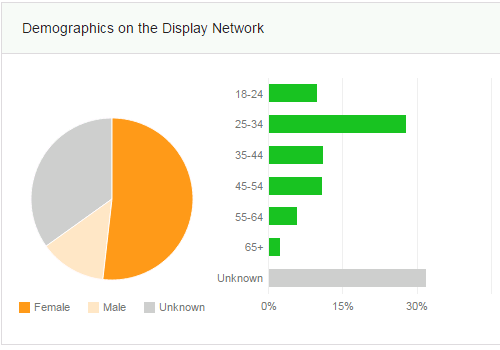
Why It's Important: This
report visually shows the demographic composition of
your audiences. (I usually look at the "converted users"
audience first.)
This report is a great, already prepared visual for
quarterly business reviews, audit finding presentations,
and other client presentations. It shows who we are
trying to reach and who we actually are reaching.
Understanding your audience demographics, especially on
different areas of your site, can be helpful for
developing personas — even if "persona" in this case
just means an informal acknowledgement that you are
mostly appealing to "men in college" (or whatever your
audience is).
The data and the personas you build from this
demographic understanding define who you should be
targeting on Google Display Network, what sort of
messaging you should use in your ad text, and the value
propositions to highlight on your landing page.
In the example above, it's clear that this audience
skews very female and 25-34. Thus, I should consider
going after new moms in my GDN campaigns or testing
imagery on my landing page showing women age 25-34 using
the product.
To continue reading the article,
please
click here.
If you have any questions/comments on the above, please email
me.
iolo's Products
are Available Through a Full Product Data Feed
Do you offer price shopping
comparison tools to your consumers? Would you like to
receive a data feed of iolo's products? If so, then
please
email me.
Product Bundle: System Mechanic 14 PLUS Search and
Recover. Only $39.95 [Save $49.95!]
We're pleased to announce an exclusive offer just for
affiliates. You can now offer your customers a bundle of
the following products:
1.
System Mechanic 14 [Regular price: $49.95]
Everything you need to fix and speed Up Your PC.
2.
Search and Recover. [Regular price: $39.95]
Rescues accidentally deleted files, photos, MP3's & more.
Great news: through the link below your customers can purchase
both titles for only $39.95! This means that they'll save a
massive $49.95.
Check
out a selection of banners for this campaign you should consider
adding to your website/blog:
|
 |
|
<a href="http://click.linksynergy.com/fs-bin/click?id=[SITE.CODE]&offerid=163695.10000042&subid=0&type=4"><IMG
border="0" alt="Iolo technologies, LLC " src="http://ad.linksynergy.com/fs-bin/show?id=[SITE.CODE]&bids=163695.10000042&subid=0&type=4&gridnum=14"></a> |
| |
|
 |
|
<a href="http://click.linksynergy.com/fs-bin/click?id=[SITE.CODE]&offerid=163695.10000043&subid=0&type=4"><IMG
border="0" alt="Iolo technologies, LLC " src="http://ad.linksynergy.com/fs-bin/show?id=[SITE.CODE]&bids=163695.10000043&subid=0&type=4&gridnum=13"></a> |
| |
|
 |
| |
|
<a href="http://click.linksynergy.com/fs-bin/click?id=[SITE.CODE]&offerid=163695.10000044&subid=0&type=4"><IMG
border="0" alt="Iolo technologies, LLC " src="http://ad.linksynergy.com/fs-bin/show?id=[SITE.CODE]&bids=163695.10000044&subid=0&type=4&gridnum=1"></a> |
There are lots more banner sizes available for this campaign
through Linkshare. If you have any size requests, or
feedback, for the banners above please
email me.
Add Promotional Videos To Your
Website/Blog
Would you like to add high quality videos that promote
iolo's products to your website [in less than 2
minutes]? Now you can! Check out the links below:
Welcome to the iolo Technologies YouTube Channel
System Mechanic Waiting
Surviving the "Xpocalypse" - End of Windows XP Support
System Mechanic's Program Accelerator™
iolo Labs Educational Series - LiveBoost™
Turbocharge Your PC
Causes of PC Slowdown
Speed up your PC with System Mechanic®
Speed Up Your PC - Run Like New Again!
Top Ten Reviews: System Mechanic 11 Review
System Mechanic is featured on CBS for 'Clean Your Computer Day'
System Mechanic Promotional Video
Please note:
In order to add the videos to your website/blog, follow the
steps below:
1. Click on the "Share" button
underneath the YouTube video
player.
2. Click on the "Embed" button
above the YouTube URL.
3. Copy and paste the resulting
code where you want the video to
display on your website/blog.
Calling All Email Marketers!
If
you have a list that you think might be interested in iolo's
software I'd like to speak with you! We have a lot of [tested
and proven] messages that can be used by email marketers through
their lists. Email me
for more details.
What Customers Are Saying...

Here're a Handful of Reasons Why You
Should Work With Us:
-
High
Conversion Rate. We convert your traffic! iolo's
respected brand, high quality software, low price point and
great value results in a conversion rate that averages 3%
across all earning affiliates. [Our top affiliates convert
at over 5%].
-
High Commission Rate: We'll pay you 30% on each and
every sale you make through the iolo affiliate program.
-
Trusted Program Management. iolo's affiliate
program is run through the Linkshare network and
professionally managed by
AMWSO.
-
45 Day Cookie. The customers you refer to us don't
have to buy right away for you to profit. We have a 45 day
tracking cookie so even if they return to our website and
purchase weeks after visiting through your site we'll still
pay you.
-
Monthly Newsletter Support. As an iolo affiliate
you'll receive an informative monthly email that will give
you the tools/resources to better market iolo's software.
We'll also keep you updated on affiliate competitions,
activation bonuses, program updates etc.
-
Keyword Support for CPC Campaigns. iolo offers
affiliates full support for paid search campaigns.
Email me for a full keyword list.
-
Parasite Free Program. As with all AMWSO managed
programs the iolo affiliate program is parasite free, and
always will be.
-
High Quality Content. iolo offers affiliates high quality
content that can be used for Web and Email Marketing.
Email me for more information.
Have a great day!
James D. Nardell
iolo Affiliate Management Team
Email:
James.Nardell@iolo.com
Phone: (805) 624-5669
IM -
JamesNardell@hotmail.com [MSN Messenger]
IM -
JamesNardell@gmail.com [Google Talk]
vCard:
JamesNardell.com
http://www.iolo.com |
iolo Website
http://www.amwso.com/iolo.php | Affiliate Support
Website
|

