|
Hi [FIRST.NAME],
Welcome to the iolo affiliate newsletter for April. In
the
last edition of the affiliate newsletter
we provided you with an article
on OptiCore, one of the automated technologies within
LiveBoost, available in the latest System Mechanic and
System Mechanic Pro.
In this edition of the newsletter
we're going to provide you with a number of resources to
help you effectively market iolo's System Mechanic 14.5
and System Mechanic 14.5 Professional.
-
Recent reviews of System Mechanic. [Including a video where
System Mechanic was featured on KTLA 5's Tech Report with
Rich Demuro].
-
iolo article; "3 Common System Repair Mistakes
Most Pros Avoid".
-
iolo Affiliate Masterclass; How to secure your Web Traffic using HTTPS.

First off, to help you with your promotion for
System Mechanic® 14.5
and/or
System Mechanic 14.5 Professional®,
we've got a deal that your customers will want to see!
Through
this landing page, your traffic/visitors can either
get $20 off System Mechanic 14.5, or purchase
System Mechanic 14.5 Professional for just $5 more i.e.
$34.95. [FYI This title usually retails for $69.95, so
this is a
huge
discount].
|
Coupon Deal:
Get $20 off System Mechanic, or go Pro for just $5 more
i.e. $34.95. [Save $35!]
Coupon Code:
N/A
Valid From: Now
Valid To: June 30, 2015 |
|
<a href="http://click.linksynergy.com/fs-bin/click?id=[SITE.CODE]&offerid=258005.10000111&type=3&subid=0"
>Get $20 off System Mechanic, or go Pro for just $5
more i.e. $34.95. [Save $35!]</a><IMG border=0 width=1
height=1 src="http://ad.linksynergy.com/fs-bin/show?id=[SITE.CODE]&bids=258005.10000111&type=3&subid=0"
> |
Recent reviews
of System Mechanic
iolo's
System Mechanic 14.5 has been getting some great reviews by
peers in the IT business. If you're looking for ideas on how to
effectively position iolo's software, the pages below [some of
which contain video content] should provide you with everything
that you'll need in order to get started!
Download.com
System Mechanic Free
March 18, 2015
http://download.cnet.com/System-Mechanic-Free/3000-18512_4-10030183.html
A very positive review of System Mechanic Free (3.5/5
stars) by one of the world’s leading tech review sites.
The review gives the program high marks for its ability
to clean out and speed up PCs and highly recommends the
program to readers.
Key quotes:
-
"System Mechanic Free is a good tool for speeding up your
computer and helping you keep it running smoothly."
-
"System Mechanic Free helps you maximize your system’s
performance by addressing a number of common issues."
-
"Through System Mechanic Free, you can tune up multiple
aspects of your computer to maximize both loading and
processing speeds."
V3
(UK)
System Mechanic FREE 14.5.1.13
March 19, 2015
http://www.v3.co.uk/v3-uk/download-review/2133787/iolo-mechanic-1081
A very positive (5/5 stars) review of System Mechanic Free,
updated for the latest version of the program by one of the
world’s leading software news and review sites. The review
highly recommends the program for its ability to optimize PCs
and highlights the new features included in version 14.5.
TechWorld
iolo System Mechanic Professional 14.5.1
March 19, 2015
http://www.techworld.com/download/system-desktop-tools/iolo-system-mechanic-professional-1451-685/
An updated very positive review (5/5 stars) of System Mechanic
Professional that highlights the new features included in
version 14.5.
PC Advisor (UK)
iolo System Mechanic 14.5.1
March 19, 2015
http://www.pcadvisor.co.uk/downloads/203/iolo-system-mechanic-140152/
A very positive review of the latest version of System Mechanic
by one of the world’s leading PC news and review sites. The
review highlights the new features included in version 14.5 and
gives the program high marks for its valuable feature set.
CHIP (Germany)
System Mechanic
March 19, 2015
http://www.chip.de/downloads/System-Mechanic_12996015.html
A positive (3/5 stars) review of System Mechanic by one of
Germany’s leading technology publications. The review gives the
program high marks for its ability to clean out and optimize
PCs.
KTLA
5's Tech Report with Rich Demuro.
Easy Steps To Speed Up Your Computer
System
Mechanic was recently featured on KTLA 5's; "TECH REPORT with
RICH DEMURO". [iolo Lab's Research Director, Damian
Giannunzio was interviewed in the report]. Check out an extract
of the article on ktla.com; "We talked to the experts at IOLO,
they make a computer program called
System
Mechanic which maintains your system for you. But, there are
a lot of things you can do on your own. Here are a few of them –
including the one thing our expert says you can do TODAY to
speed up your computer instantly..." Read more [and view the
video]
here.
Please note: To embed the video on your
website/blog, please click on the "Embed" button on the top of
the video player in order to generate the necessary code.
If you have any questions/comments on the above, please email
me.
Please note:
Feel free to use the copy/graphics below on your
website/blog.
3 Common System Repair
Mistakes Most Pros Avoid
Mistake #1: Assuming system repair
involves reinstalling or upgrading the operating system
Urk! Your PC is crashing or slowing down or downright...glitchy,
and you've just hurled a few choice words to the heavens about
Microsoft Windows, but is it really your OS's fault? Many
computer experts know that even an operating system in perfect
shape could not prevent many of the root causes of computer
slowdown. In fact, it isn't even aware of most of the core
issues behind PC slowdown, system crashes and frustrating
freezes.
Your best first step?
Knowing exactly what's wrong and avoiding trial and error
remedies. Find a free system health scan that can pinpoint the
real bottlenecks affecting your PC.
This one is excellent.
Mistake #2: Doing scheduled or manual maintenance to prevent
the need for system repair
Believe it or not, your computer is processing several billion
instructions…per second! So when things start to go wrong, they
can quickly affect performance. Registry settings that become
obsolete or include errors, memory getting trapped by greedy
programs, interdependent program files scattered around the hard
drive, unwanted programs sneaking into your start up menu, junk
files and remnants building up – they are all happening as you
work. And it's all happening faster than you can possibly
hope to keep up with it.
Imagine a large, busy bakery factory running 24/7 that never
gets cleaned and stacks supplies haphazardly all over the place.
How long do you think they'd stay in business? An operation like
this would even struggle with weekly or daily maintenance. They
would have to keep up an ongoing maintenance to keep their head
above water.
System optimizing has to be more robust than the forces
against it. That means any solution that hopes to keep a PC
fast and prevent the need for system repair must be automatic,
able to recognize and resolve core issues and have the power to
quickly fix only what needs to be fixed, without itself becoming
a resource drain.
Mistake #3: Thinking system repair is the answer to slow
running programs
While there may be many reasons why a program runs slow, one of
the most common is that it simply isn't getting the system
resources it needs to run as it was designed to.
Why?
Few people realize that their operating system is set by default
to an "balanced power mode" designed to hold back processor
resources to save energy. But unless all you do is write and
send emails, a balanced power mode will leave you dragging. Even
today's "average" programs use more system resources than ever
before. They have more extensive files and have often grown two
or three times the size they were just a few versions ago. They
frequently maintain a connection to online services and demand
more memory to run. At the same time, users have gotten into the
habit of leaving programs and files open as they multitask and
each one draws on system resources. And then there is the
proliferation of resource intensive applications such as gaming,
video editing, and graphics programs that will drag performance
under its wheels unless you system power is focused directly on
their operations
Here's what you can do to remedy this. Click on your start
button and go to "search programs and files" field at the
bottom. Type "power options" you and hit enter.
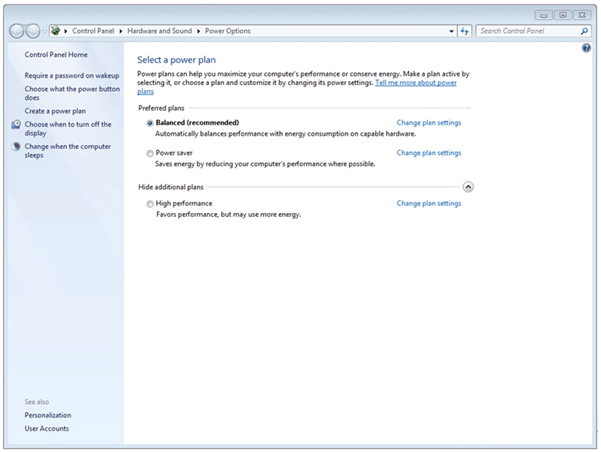
Windows 7 Power Options
This is your power plan screen. As you can see, you have three
choices: Balanced (average), Power saver and High performance.
Activating High Performance mode will favor more CPU power but
use more energy – something a laptop user may have concerns
about. The speed of your program might still struggle against an
environment where many open files are competing for processor
resources. While High Performance mode may boost performance in
some heavy-demand programs, manually having to switch settings
will have you lagging behind your rapidly changing power needs
(as noted in Mistake #2). Also, High Performance mode kicks in
after a drop in speed and response has already been felt.
This is a much more comprehensive solution.
Summary:
No matter what challenges your user experience, keep these
points in mind and you'll make better decisions when it comes to
getting the best performance from your PC:
-
Your operating system environment can be tuned better than
how it was right out of the box.
-
Despite marketing claims, your operating system was never
intended to manage everything.
-
Many issues are not rooted in the operating system itself,
but in the unmanaged gaps between the OS, the programs and
the various indexes, settings and storage points throughout
the system.
iolo Affiliate
Masterclass
How to secure your Web Traffic using
HTTPS
Performance Marketing Insider recently ran an
extremely useful article on how [and why] to secure your
web traffic using HTTPS. Below is
a section from the article.
If you want your web traffic to be secured, the easiest
option is to add an SSL certificate. This will encrypt
the data that is sent to and from your website, so any
third parties that intercept it won’t be able to see
what the data actually is. In addition, you’ll get a
slight SEO boost from Google, so there is really no
reason not to do it.
Securing your traffic is fairly easy, and for most sites
it is free. These instructions will use HostGator
hosting of a WordPress site as an example. Almost all
hosting companies and CMS’s, however, will work in a
very similar way so you should be able to adjust these
instructions to meet your needs no matter what type of
site you have.
HostGator (and almost all hosting companies) offer a
free shared SSL certificate to their customers, so you
shouldn’t have to spend a dime to secure your site.
Step 1: Find your Shared SSL Certificate
To continue reading the article,
please
click here.
If you have any questions/comments on the above, please email
me.
iolo's
Products are Available Through a Full Product Data Feed
Do you offer price shopping comparison tools to your
consumers? Would you like to receive a data feed of
iolo's products? If so, then please
email me.
Product Bundle: System Mechanic 14.5 PLUS Search and
Recover. Only $39.95 [Save $49.95!]
We're pleased to announce an exclusive offer just for
affiliates. You can now offer your customers a bundle of
the following products:
1.
System Mechanic 14.5 [Regular price: $49.95]
Everything you need to fix and speed Up Your PC.
2.
Search and Recover. [Regular price: $39.95]
Rescues accidentally deleted files, photos, MP3's & more.
Great news: through the link below your customers can purchase
both titles for only $39.95! This means that they'll save a
massive $49.95.
Check
out a selection of banners for this campaign you should consider
adding to your website/blog:
|
 |
|
<a href="http://click.linksynergy.com/fs-bin/click?id=[SITE.CODE]&offerid=163695.10000042&subid=0&type=4"><IMG
border="0" alt="Iolo technologies, LLC " src="http://ad.linksynergy.com/fs-bin/show?id=[SITE.CODE]&bids=163695.10000042&subid=0&type=4&gridnum=14"></a> |
| |
|
 |
|
<a href="http://click.linksynergy.com/fs-bin/click?id=[SITE.CODE]&offerid=163695.10000043&subid=0&type=4"><IMG
border="0" alt="Iolo technologies, LLC " src="http://ad.linksynergy.com/fs-bin/show?id=[SITE.CODE]&bids=163695.10000043&subid=0&type=4&gridnum=13"></a> |
| |
|
 |
| |
|
<a
href="http://click.linksynergy.com/fs-bin/click?id=[SITE.CODE]&offerid=163695.10000044&subid=0&type=4"><IMG
border="0" alt="Iolo technologies, LLC "
src="http://ad.linksynergy.com/fs-bin/show?id=[SITE.CODE]&bids=163695.10000044&subid=0&type=4&gridnum=1"></a> |
There are lots more banner sizes available for this campaign
through Linkshare. If you have any size requests, or
feedback, for the banners above please
email me.
Add Promotional Videos To
Your Website/Blog
Would you like to add high quality videos that promote
iolo's products to your website [in less than 2
minutes]? Now you can! Check out the links below:
Welcome to the iolo Technologies YouTube Channel
System Mechanic Waiting
Surviving the "Xpocalypse" - End of Windows XP Support
System Mechanic's Program Accelerator™
iolo Labs Educational Series - LiveBoost™
Turbocharge Your PC
Causes of PC Slowdown
Speed up your PC with System Mechanic®
Speed Up Your PC - Run Like New Again!
Top Ten Reviews: System Mechanic 11 Review
System Mechanic is featured on CBS for 'Clean Your Computer Day'
System Mechanic Promotional Video
Please note:
In order to add the videos to your website/blog, follow the
steps below:
1. Click on the "Share" button
underneath the YouTube video
player.
2. Click on the "Embed" button
above the YouTube URL.
3. Copy and paste the resulting
code where you want the video to
display on your website/blog.
Calling All Email Marketers!
If you
have a list that you think might be interested in iolo's
software I'd like to speak with you! We have a lot of [tested
and proven] messages that can be used by email marketers through
their lists. Email me
for more details.
What Customers Are Saying...

Here're a Handful of Reasons Why
You Should Work With Us:
-
High Conversion Rate. We convert your traffic! iolo's
respected brand, high quality software, low price point and
great value results in a conversion rate that averages 3%
across all earning affiliates. [Our top affiliates convert
at over 5%].
-
High Commission Rate: We'll pay you 40% on each and
every sale you make through the iolo affiliate program.
-
Trusted Program Management. iolo's
affiliate program is run through the Linkshare network and
professionally managed by
AMWSO.
-
120 Day Cookie. The customers you
refer to us don't have to buy right away for you to profit.
We have a 120 day tracking cookie so even if they return to
our website and purchase weeks after visiting through your
site we'll still pay you.
-
Monthly Newsletter Support. As an
iolo affiliate you'll receive an informative monthly email
that will give you the tools/resources to better market
iolo's software. We'll also keep you updated on affiliate
competitions, activation bonuses, program updates etc.
-
Keyword Support for CPC Campaigns.
iolo offers affiliates full support for paid search
campaigns.
Email me for a full keyword list.
-
Parasite Free Program. As with all
AMWSO managed programs the iolo affiliate program is
parasite free, and always will be.
-
High Quality Content. iolo offers
affiliates high quality content that can be used for Web and
Email Marketing.
Email me for more information.
Have
a great day!
James D. Nardell
iolo Affiliate Management Team
Email:
James.Nardell@iolo.com
Phone: (805) 624-5669
IM -
JamesNardell@hotmail.com [MSN Messenger]
IM -
JamesNardell@gmail.com [Google Talk]
vCard:
JamesNardell.com
http://www.iolo.com |
iolo Website
http://www.amwso.com/iolo.php | Affiliate Support
Website
|

