Welcome to the iolo affiliate newsletter for May. In the
last edition of the affiliate newsletter
we
provided you with a promotional video [and some copy] to
help you market System Mechanic to Windows XP users i.e.
help them to survive the "XPocalypse".
In this edition of the newsletter
we're going go deeper into this topic, and present you
with a more detailed article on how System Mechanic can
help Windows XP users; "5 Musts to Help Secure
Your Windows OS".
Suggestion/thought: There are many
companies out there [both big and small] with XP on
their computer systems/networks who'll be very
interested in a solution that'll help them continue to
use the XP operating system for a while longer before
they finally upgrade,
System Mechanic Business is the tool/solution that
they'll need!

First off though, to help you with your promotion for
System Mechanic® 12.7
and/or
System Mechanic 12.7 Professional®,
we're offering your customers a massive
discount! Through
this landing page, they can either get 50% off
System Mechanic 12.7, or purchase
System Mechanic 12.7 Professional for just $5 more i.e.
$29.95. [FYI This title usually retails for $69.95, so
this is a
huge
discount]. You can grab the code to
add this deal to your website/blog below:
Please note:
Feel free to use the copy/graphic/video below on your
website/blog.
Surviving the
“XPocalypse” with System Mechanic©
5 Musts to Help Secure Your Windows OS
Batten Down the Patches. Making sure existing
security patches and driver updates for Windows XP are
as current as possible is the first step toward
adequately protecting your PC. From there, avoiding use
of unsecure programs becomes paramount.
-
Update security patches: Security Optimizer™
-
Update hardware drivers: Designated Drivers™
-
Set up a new default browser: Windows Control Panel
-
Remove unsecure programs: Advanced Uninstaller™
-
Disable unsecure plug-ins: Startup Manager™
»View other tips in our “XPocalypse” Tip Series
How do I update security patches?
Security Optimizer™ finds and plugs security
holes in the Windows OS. Run this tool to help ensure
your PC has the latest available threat definitions
Microsoft supplies.
Here’s how:
-
Start System
Mechanic and click Toolbox » Individual Tools
» Enhance Protection
-
Find Security
Optimizer™ in the list of tools and click
Start
-
Select the
Quick Security Optimization option, then
click Next.
For a deeper
analysis with manual options, select Custom
Inspection and Report and follow The associated
steps.
-
Security Optimizer
will then scan your system for vulnerabilities,
correct any it finds, and display a summary
report.
-
If a system
restart is required to finish a fix, click
Restart Now – otherwise click Exit.
|
↑ Back to Top
How do I update
hardware drivers?
Designated Drivers™ will help you obtain
Microsoft’s existing driver updates, so you’re starting
off protected with the latest support offered for your
OS.
Here’s how:
-
Start System
Mechanic and click Toolbox » Individual Tools
» Maximize Performance
-
Find Designated
Drivers™ and click Start
-
Follow the
on-screen instructions, using the Help
button for further info as needed
-
Restart your PC to
ensure all changes have been applied
|
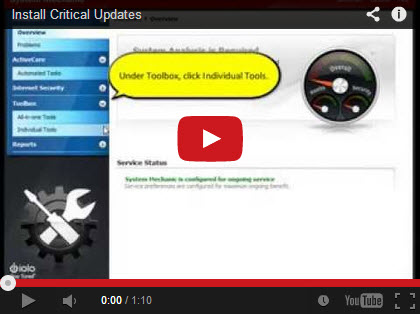
View an onscreen tutorial for Designated Drivers below:
↑ Back to Top
I’m using Internet
Explorer. How do I default to a more secure web browser?
Since Internet Explorer 8 no longer receives the latest
security updates, it’s recommended you change your
default browser to either Chrome or Firefox, both of
which will continue to support Windows XP. You can
change default programs in the Windows Control Panel.
Here’s how:
-
In the Windows
Start menu, select Control Panel
-
On the upper right
in the View by: pull-down menu make sure
Large icons is selected
-
Click default
programs
-
Click Set your
default programs
-
From the list on
the left choose Google Chrome or
Mozilla Firefox and select Set this
program as default.
-
Click OK
Bonus Tip: If
you’re installing Chrome or Firefox for the
first time, when prompted to set the default web
browser, choose Set as default. If these
programs are installed but not currently the default
browser, they will ask if you want to set them as
the default browser each time you open them. If you
see this option, choose one to Set as default. |
↑ Back to Top
I’m using Internet
Explorer. How do I default to a more secure web browser?
Advanced Uninstaller™ allows you to thoroughly
uninstall software, even if the program did not come
with an uninstallation function (32-bit OS only). This
feature uses advanced techniques to help ensure the
complete elimination of a program and all its
components. You can use it to remove programs that no
longer receive security updates for XP – for example,
the now-defunct Outlook Express, as well as Adobe Reader
and Flash.
Here’s how:
-
Start System
Mechanic and click Toolbox » Individual Tools
» Manage System Configuration
-
Find Advanced
Uninstaller™ and click Start
-
If the program you
want to uninstall is on the list, select
it and click Start Selected Uninstaller,
and follow the onscreen instructions.
-
If the program you
want to uninstall is not on the list or
has an invalid uninstaller, click Uninstall
Program Not Listed.
-
Select the program
to uninstall, and click Next
-
On the Options
screen, specify files you want removed as part
of the uninstallation. The default selections
will be appropriate for most users.
-
Click Help
for details on Uninstallation depth and scope.
Check all boxes to completely remove a program.
-
When you are
finished setting options, click Next to
run the uninstallation
|
↑ Back to Top
If I still use an app, how do I prevent unsecure components within it from launching?
Startup Manager™ allows you to disable, rather
than remove, unsecure plug-ins so they never launch.
Since its browser plug-in will no longer update for
Windows XP users, you should disable Java from running
in the Internet Explorer 8 web browser. You can then run
stand-alone Java-based applications without your browser
unsecurely running content online.
Here’s how:
-
Start System
Mechanic and click Toolbox » Individual Tools
» Manage System Configuration
-
Find Startup
Manager™ and click Start.
-
In the left
column, click once on the program whose
component you want to disable. Internet Explorer
browser plug-ins can be found by selecting the
main Internet Explorer heading.
-
A list of
components you can disable appears on the right.
A green thumb icon indicates the component is
necessary and should remain on. A blue profile
icon indicates User Choice and may be disabled.
-
Select the
undesired component and click Disable. When
asked if you are sure, click Yes.
-
Click Exit to
return to the Individual Tools menu.
|
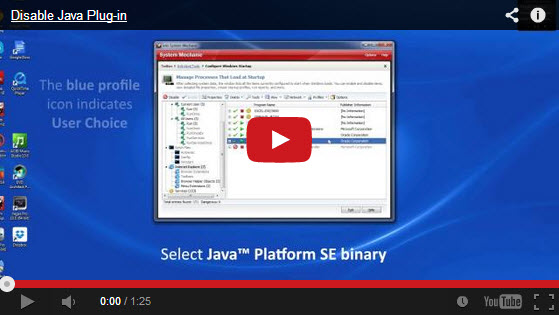
View an onscreen tutorial that walks you through disabling the Java plug-in for
Internet Explorer below:
↑ Back to Top
iolo Affiliate
Masterclass
How To Improve Your CTR [Click Through
Rate]
One of the most important skills an affiliate marketer can
have is the ability to generate solid CTRs [through both
images and landing pages]. If you can't do this, you
will never get anywhere with your campaigns...In case
you're not familiar with CTR, below is how to calculate
it:
Click-through rate (%) = Click-throughs (#) / Impressions
(#)
When you achieve a higher CTR, you'll be able to get lower
click prices through paid search campaigns. In general,
most self-serve advertising platforms will give you
lower CPCs [Cost Per Clicks] as you increase your CTR.
Please note: A high CTR is doesn't always
equate to the highest profits. In some cases, very high
CTRs can lead to lower CRs [Conversion Rates]. That
said, in general, high CTRs alongside solid landing
pages equate to high $$$s.
So...What are some ways to increase your CTR?
The most simple answer is that you must make your
campaigns targeted.
-
Learn everything you can about your demographic.
-
Define your demographic as clearly as possible.
[Instead of "Speed Up My PC" for example, look into
"Speed up a slow laptop in Los Angeles".
-
Learn where your demographic can be found on the
Internet i.e. which websites/blogs.
-
Design an ad that's focused to your demographic.
-
Work out how to appeal to your demographic in terms
of; images, landing pages and keywords. [You'll need
to find images related to your specific demographic,
and develop a creative headline/body that'll speak
to them].
Here are a few more CTR boosters!
-
Offer an incentive. [Carrots work much better
than sticks online!]
-
Create urgency. If there's a time limit,
people are more likely to take action.
-
Grab your prospects attention. Stand-out
headlines, sound, video, and graphics can all work
well.
-
Replicate other campaigns. A lot of the
bigger brands/players have already done a lot of
testing, so you can short-cut the CTR boosting
process by replicating [not copying] some aspects of
what they're doing.
-
Typography that get's noticed. Grab peoples
attention with unique fonts, big fonts different
types of writing etc.
-
Ugly can work. Really! 'Unprofessional'
graphics, and landing pages, can often [but not
always] boost CTRs.
-
Geo-targeted scripts. If you can,
geo-targeted scripts is a great way to grab
prospects attention.
-
Try different submit buttons. There are so
many options for 'Buy Now' buttons. Try some
different versions, and see what works. [This
strategy alone can have a material impact on CTRs].
If you have any questions/comments on the above, please
email me.
iolo's Products
are Available Through a Full Product Data Feed
Do you offer price shopping
comparison tools to your consumers? Would you like to
receive a data feed of iolo's products? If so, then
please
email me.
Product Bundle: System Mechanic 12.7 PLUS Search and
Recover. Only $39.95 [Save $49.95!]
We're pleased to announce an exclusive offer just for
affiliates. You can now offer your customers a bundle of
the following products:
1.
System Mechanic 12.7 [Regular price: $49.95]
Everything you need to fix and speed Up Your PC.
2.
Search and Recover. [Regular price: $39.95]
Rescues accidentally deleted files, photos, MP3's & more.
Great news: through the link below your customers can purchase
both titles for only $39.95! This means that they'll save a
massive $49.95.
Check
out a selection of banners for this campaign you should consider
adding to your website/blog:
|
 |
|
<a href="http://click.linksynergy.com/fs-bin/click?id=[SITE.CODE]&offerid=163695.10000042&subid=0&type=4"><IMG
border="0" alt="Iolo technologies, LLC " src="http://ad.linksynergy.com/fs-bin/show?id=[SITE.CODE]&bids=163695.10000042&subid=0&type=4&gridnum=14"></a> |
| |
|
 |
|
<a href="http://click.linksynergy.com/fs-bin/click?id=[SITE.CODE]&offerid=163695.10000043&subid=0&type=4"><IMG
border="0" alt="Iolo technologies, LLC " src="http://ad.linksynergy.com/fs-bin/show?id=[SITE.CODE]&bids=163695.10000043&subid=0&type=4&gridnum=13"></a> |
| |
|
 |
| |
|
<a href="http://click.linksynergy.com/fs-bin/click?id=[SITE.CODE]&offerid=163695.10000044&subid=0&type=4"><IMG
border="0" alt="Iolo technologies, LLC " src="http://ad.linksynergy.com/fs-bin/show?id=[SITE.CODE]&bids=163695.10000044&subid=0&type=4&gridnum=1"></a> |
There are lots more banner sizes available for this campaign
through Linkshare. If you have any size requests, or
feedback, for the banners above please
email me.
Add Promotional Videos To Your
Website/Blog
Would you like to add high quality videos that promote
iolo's products to your website [in less than 2
minutes]? Now you can! Check out the links below:
Welcome to the iolo Technologies YouTube Channel
Surviving the "Xpocalypse" - End of Windows XP Support
System Mechanic's Program Accelerator™
iolo Labs Educational Series - LiveBoost™
Turbocharge Your PC
Causes of PC Slowdown
Speed up your PC with System Mechanic®
Speed Up Your PC - Run Like New Again!
Top Ten Reviews: System Mechanic 11 Review
System Mechanic is featured on CBS for 'Clean Your Computer Day'
System Mechanic Promotional Video
Please note:
In order to add the videos to your website/blog, follow the
steps below:
1. Click on the "Share" button
underneath the YouTube video
player.
2. Click on the "Embed" button
above the YouTube URL.
3. Copy and paste the resulting
code where you want the video to
display on your website/blog.
Calling All Email Marketers!
If
you have a list that you think might be interested in iolo's
software I'd like to speak with you! We have a lot of [tested
and proven] messages that can be used by email marketers through
their lists. Email me
for more details.
What Customers Are Saying...

Here're a Handful of Reasons Why You
Should Work With Us:
- High
Conversion Rate. We convert your traffic! iolo's
respected brand, high quality software, low price point and
great value results in a conversion rate that averages 3%
across all earning affiliates. [Our top affiliates convert
at over 5%].
-
High Commission Rate: We'll pay you 30% on each and
every sale you make through the iolo affiliate program.
- Trusted Program Management. iolo's affiliate
program is run through the Linkshare network and
professionally managed by
AMWSO.
- 45 Day Cookie. The customers you refer to us don't
have to buy right away for you to profit. We have a 45 day
tracking cookie so even if they return to our website and
purchase weeks after visiting through your site we'll still
pay you.
- Monthly Newsletter Support. As an iolo affiliate
you'll receive an informative monthly email that will give
you the tools/resources to better market iolo's software.
We'll also keep you updated on affiliate competitions,
activation bonuses, program updates etc.
- Keyword Support for CPC Campaigns. iolo offers
affiliates full support for paid search campaigns.
Email me for a full keyword list.
- Parasite Free Program. As with all AMWSO managed
programs the iolo affiliate program is parasite free, and
always will be.
- High Quality Content. iolo offers affiliates high quality
content that can be used for Web and Email Marketing.
Email me for more information.
Have a great day!
James D. Nardell
iolo Affiliate Management Team
Email:
James.Nardell@iolo.com
Phone: (805) 624-5669
IM -
JamesNardell@hotmail.com [MSN Messenger]
IM -
JamesNardell@gmail.com [Google Talk]
vCard:
JamesNardell.com
http://www.iolo.com |
iolo Website
http://www.amwso.com/iolo.php | Affiliate Support
Website

