|
Hi [FIRST.NAME],
Welcome to the second edition of the iolo affiliate newsletter
for February. In the
last edition of the affiliate newsletter
we introduced you to some new
foreign language creative; namely banners in French,
Italian and Spanish.
[Please note: The corresponding cart pages are also in the target
language with the respective currency of the country].
In this edition of the newsletter
we want
to remind you about iolo's security product;
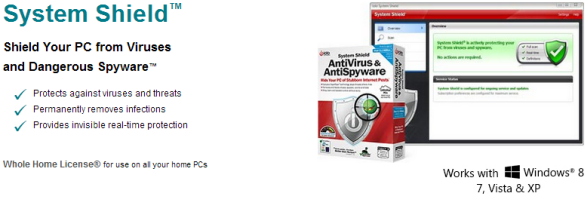
System Shield AntiVirus and AntiSpyware, and
provide you with a brief outline on this award winning
software title, as well as a closer look at
Spyware...This newsletter includes copy from two
newsletters which were sent through iolo's lists, ["Spotlight
on System Shield AntiVirus and AntiSpyware" & "Security Spotlight: A Closer Look at Spyware"], and
you're welcome to use the
copy/graphics on your website/blog.

First off, to help you with the promotion of System
Shield AntiVirus and AntiSpyware, we're offering your
customers a 50% off retail coupon! You can grab the code
to add the coupon to your website/blog below:
Please note:
Feel free to use the copy/graphics from the article below on your website/blog.
Spotlight on System
Shield AntiVirus and AntiSpyware
There are many security products out there to choose from,
but what makes iolo's System Shield stand out from the
crowd is how iolo leverages its 15 years of PC
performance focus to this type of product.
Unlike other security programs that can be heavy-handed
and slow your PC down with excessive processing, System
Shield is ultra-effective, yet quiet, efficient and
lean. It provides everything you need to stay secure,
and nothing you don't.
Built on performance research
After thousands of interviews with customers, friends,
family and co-workers who had all but sworn off security
software due to performance annoyances, iolo's goal was
to create an effective program that wouldn't have the
lag and resource drain typically associated with
security applications.
After three years of research and development, the end
result is the new System Shield AntiVirus and
AntiSpyware, which bridges the gap between
performance and protection. System Shield uses
less memory and CPU resources than any other
security software we tested, all while protecting you
from more than 2.1 million different viruses and
threats.
By providing full-fledged security without sacrificing
PC efficiency, System Shield is making believers out of
those who doubted security and speed could go
hand-in-hand.
Blocks and removes all forms of
malicious threats
System Shield protects your PCs from:
 |
Viruses |
|
Backdoors
|
 |
|
|
Spyware |
|
Tracking
software |
|
|
Worms |
|
Polymorphic attacks |
|
|
Trojan horses |
|
Password
theft |
|
|
Rootkits |
|
Identity
theft |
|
|
Bots |
|
Crimeware |
|
|
Keyloggers |
|
Ransomware |
|
|
Adware |
|
Scumware |
| |
|
and more... |
|
Total
Protection |
Maximum
Performance |
Superior
Technology |
|
Shop,
bank and socialize without worry |
No bloat
or slowdowns |
Exclusive Sentient™ technology |
|
With real-time updates,
viruses and spyware are instantly eradicated, and new
attacks are stopped before infection occurs. |
High-performance threat
detection stops viruses and spyware quietly without
slowing or interrupting games, videos or other programs. |
Proprietary artificial
intelligence heuristics detect and block virus
mutations, shape-shifters, and other yet-unclassified
threats. |
 |
 |
 |
In addition to being available as a standalone product,
System Shield is part of the System Mechanic
Professional® suite of products.
To learn more about System Shield, please check out the
links below:
Security Spotlight: A Closer Look
at Spyware
Part of iolo's ongoing series exposing malicious software
 With
iolo's Security Spotlight series, you can learn about the
various malicious programs that infect computers, destroy data,
and steal personal information, and get some valuable pointers
on how to protect yourself. With
iolo's Security Spotlight series, you can learn about the
various malicious programs that infect computers, destroy data,
and steal personal information, and get some valuable pointers
on how to protect yourself.
Knowledge is power—knowing more about what the high-tech
vandals are up to can give you a powerful defense against their
tactics.
This part of the series takes a closer look at one of the most
invasive and widely spread types of malware, spyware.
What is spyware?
Spyware is tracking software that silently installs itself on
your computer, monitors (and sometimes controls) your internet
activity, and then sends private information about you back to
its creator.
The reasons why spyware programs are created can range from the
benign (targeted advertising) to the malicious (criminal
identity theft). But while the aims of spyware may vary, the
effects are the same: compromised privacy and a computer
overburdened with needless background processing. A slow and
unstable computer is one of the most common signs of a spyware
infection. (You can read more spyware symptoms below in "Signs
of a spyware infection.")
A little history
The term "spyware" was first used in the early 1990s to refer to
programs used for surveillance or espionage. But since 2000,
with the advent of data-mining advertising software, spyware has
retained its current meaning: software that monitors and
collects private data without the user's knowledge or consent.
Spyware of today
Over the years, spyware has become much more widespread and more
aggressive. Today, spyware goes beyond just monitoring and now
can interfere with the control of your own computer: changing
your browser's home page, redirecting you to sites you didn't
want to see, installing distracting and unwanted toolbars. All
these random and uncontrollable processes basically "hijack"
your computer and needlessly sap its resources.
Some infamous spyware
-
BonziBuddy, a program released in 1999, displayed a
purple monkey that was supposed to be a fun "traveling
companion" as you browsed the internet. But BonziBuddy was
reported to reset browser home pages, to track private
information and send it to third parties, and to display
incessant (and sometimes obscene) ads. In 2007, BonziBuddy
earned the dubious distinction of being voted one of the
"Top 10 Most Annoying Tech Products" by PC World readers.
-
Aurora, a program released in 2005 by Direct Revenue,
was reported to display adware, thwart valid security
programs, overwrite other spyware, and send infected
computers up to 30 pop-up messages a day. The result was a
rash of irate consumers experiencing daily computer crashes
and barely usable PCs. In 2007, for what the U.S. Federal
Trade Commission deemed deceptive practices, Direct Revenue
settled with the government for $1.5 million; the company
closed its doors later the same year.
Where does spyware come from?
The most common methods of spyware infection are through web
downloads, e-mail, instant messaging, and peer-to-peer file
sharing—unfortunately, all the same ways that you get valid
applications. And today's malware creators often bundle threats
together—spyware will often install itself with other malicious
programs, like viruses or
trojans.
Signs of a spyware infection
Spyware is designed to install silently, and without the use of
an anti-spyware program, it's often difficult to detect. But
there are some warning signs: if your computer is experiencing
any of the following symptoms, it may be infected with spyware.
-
Endless pop-up windows keep displaying, even when you're not
on the web.
-
Your browser's home page suddenly changes.
-
You're redirected to web sites that are different from the
address you typed in the browser.
-
New, unexpected toolbars appear in your web browser.
-
New, unexpected icons appear in your PC's system tray.
-
Your computer suddenly takes a lot more time to open
programs.
-
Your computer suddenly become unstable and crashes
frequently.
How you can protect yourself
-
Don't follow links in pop-up windows. Those
ubiquitous pop-up windows are a common source of spyware—and
if the pop-up is offering security software, you should be
especially skeptical. Many of these pop-ups will try to lure
you into installing "scareware," dangerous programs that
actually install the infections they claim to remove.
Read more about scareware and other common online scams.
One important tip: To close the pop-up, do not click on any
of the buttons inside of the window, even if it's a "Close"
or "Exit" button—the creators of these pop-ups try to trick
you into installing spyware, so they'll design ALL of the
buttons to install the infection. The safest way to close a
pop-up is to click on the "X" icon on the top right side of
the window's title bar (or for a keyboard shortcut: click
ALT + F4).
-
Be cautious of free programs. Some disreputable sites
offer free tools, like browser toolbars, games, and screen
savers, that are created with the sole intent of spreading
spyware. Only download free programs from reputable sites
and vendors that you trust.
-
Use anti-malware software. Even with the most
diligent preventative measures, spyware can still find its
way onto your computer. The best bet is to install an
anti-spyware or anti-malware program, keep it up-to-date,
and run scans regularly.
How System Shield can protect you
iolo's System Shield combines both antivirus and antispyware
protection, to detect and eradicate all types of malicious
files: spyware as well as dozens of other types of malware. Some
highlights of System Shield:
 |
|
Flexible
options for scans |
|
System
Shield’s malware scans can run automatically when your
computer isn’t being used—you don’t have to think about
it—and you also can run scans whenever you want to: a
smart choice after you download files. |
 |
|
Automated protection 2 ways |
|
For total
peace of mind, System Shield offers two automated
protection features:
•
Real-time is an
invisible form of protection that runs quietly
behind-the-scenes to check files as they’re opened,
changed, moved, copied, and saved—a critical defense
against malware silently making changes to your PC.
•
Email protection
automatically scans email messages and attachments
before they’re received or sent—both you and the
people you communicate with are protected. |
 |
|
Safe
quarantine |
|
System
Shield’s Quarantine is a safe holding area that gives
you total control over suspicious files. The Quarantine
prevents infections from causing any damage, but still
allows you to keep the files you know are safe. |
 |
|
Up-to-date malware definitions |
|
Old
definition files can’t protect you against the most
recent attacks—and the criminals come up with newly
designed malware every day. System Shield updates its
definitions in real-time as threats emerge, sometimes
even 8-10 times in a single day, based on the latest
research from iolo Labs. |
iolo's Products
are Available Through a Full Product Data Feed
Do you offer price shopping
comparison tools to your consumers? Would you like to
receive a data feed of iolo's products? If so, then
please
email me.
Product Bundle: System Mechanic 12.5 PLUS Search and
Recover. Only $39.95 [Save $49.95!]
We're pleased to announce an exclusive offer just for
affiliates. You can now offer your customers a bundle of
the following products:
1.
System Mechanic 12.5 [Regular price: $49.95]
Everything you need to fix and speed Up Your PC.
2.
Search and Recover. [Regular price: $39.95]
Rescues accidentally deleted files, photos, MP3's & more.
Great news: through the link below your customers can purchase
both titles for only $39.95! This means that they'll save a
massive $49.95.
Check
out a selection of banners for this campaign you should consider
adding to your website/blog:
There are lots more banner sizes available for this campaign
through Linkshare. If you have any size requests, or
feedback, for the banners above please
email me.
Add Promotional Videos To Your
Website/Blog
Would you like to add high quality videos that promote
iolo's products to your website [in less than 2
minutes]? Now you can! Check out the links below:
System Mechanic's Program Accelerator™
Top Ten Reviews: System Mechanic 11 Review
System Mechanic is featured on CBS for 'Clean Your Computer Day'
System Mechanic Promotional Video
Please note:
In order to add the videos to your website/blog, follow the
steps below:
1. Click on the "Share" button
underneath the YouTube video
player.
2. Click on the "Embed" button
next to the YouTube URL.
3. Copy and paste the resulting
code where you want the video to
display on your website/blog.
Calling All Email Marketers!
If
you have a list that you think might be interested in iolo's
software I'd like to speak with you! We have a lot of [tested
and proven] messages that can be used by email marketers through
their lists. Email me
for more details.
What Customers Are Saying...

Here're a Handful of Reasons Why You
Should Work With Us:
- High
Conversion Rate. We convert your traffic! iolo's
respected brand, high quality software, low price point and
great value results in a conversion rate that averages 3%
across all earning affiliates. [Our top affiliates convert
at over 5%].
-
High Commission Rate: We'll pay you 30% on each and
every sale you make through the iolo affiliate program.
- Trusted Program Management. iolo's affiliate
program is run through the Linkshare network and
professionally managed by
AMWSO.
- 45 Day Cookie. The customers you refer to us don't
have to buy right away for you to profit. We have a 45 day
tracking cookie so even if they return to our website and
purchase weeks after visiting through your site we'll still
pay you.
- Monthly Newsletter Support. As an iolo affiliate
you'll receive an informative monthly email that will give
you the tools/resources to better market iolo's software.
We'll also keep you updated on affiliate competitions,
activation bonuses, program updates etc.
- Keyword Support for CPC Campaigns. iolo offers
affiliates full support for paid search campaigns.
Email me for a full keyword list.
- Parasite Free Program. As with all AMWSO managed
programs the iolo affiliate program is parasite free, and
always will be.
- High Quality Content. iolo offers affiliates high quality
content that can be used for Web and Email Marketing.
Email me for more information.
Have a great day!
James D. Nardell
iolo Affiliate Management Team
Email:
James.Nardell@iolo.com
Phone: (805) 624-5669
IM -
JamesNardell@hotmail.com [MSN Messenger]
IM -
JamesNardell@gmail.com [Google Talk]
http://www.iolo.com |
iolo Website
http://www.amwso.com/iolo.php | Affiliate Support
Website
|