iolo December Newsletter


Dear [FIRST.NAME],

Welcome to the iolo affiliate newsletter for December. In the last edition of the affiliate newsletter,
we introduced you to an iolo.com Article: "5 Tips to Increase System Speed with System Mechanic".

In this edition of the newsletter we're going to cover the following items:

  1. System Mechanic 18.5 / System Mechanic Pro 18.5 - They're Coming Soon!

  2. Holiday Coupons For 2018/2019.

  3. New Banner Set for System Mechanic 18.5.

  4. Affiliate Masterclass; "Google's Allowing Comments on SERPs - Let The Conspiracies Begin!"

Thanks for all that you do!


Regards,
iolo technologies Affiliate Program Team
affiliates@iolo.com


System Mechanic 18.5 / System Mechanic Pro 18.5 - They're Coming Soon!


Please note: Feel free to use the copy below on your website/blog. [You can learn more about iolo technologies' System Mechanic here].


Great news! Both System Mechanic 18.5 and System Mechanic Pro 18.5 will shortly be available for purchase. So what's new? The short answer is a lot! Read on for details.


Protects You. Boost your privacy. With System Mechanics new Privacy Shield 2.0, stop Windows 10 from collecting data on your browsing history, preferred Windows 10 features, and installed apps. Your data--your choice.


Accelerates You. Could your network speed be faster? Our iolo engineers think so. That's why System Mechanic 18.5 will give you the power to easily prioritize how Windows 10 uses your bandwidth, freeing up vital resources to help you download, surf and work faster.


Supports You. Our latest user interface enhancements make this version of System Mechanic the most intuitive ever. Swiftly access main features from our new, centralized action button. Choose between a quick or deep scan of your PC directly from the System Mechanic Dashboard. And give your eyes a break with our new "dark mode".


Plus...


Color Theme Options

The System Mechanic 18.5 new interface offers two color themes, from which to choose. The default color theme is Dark.
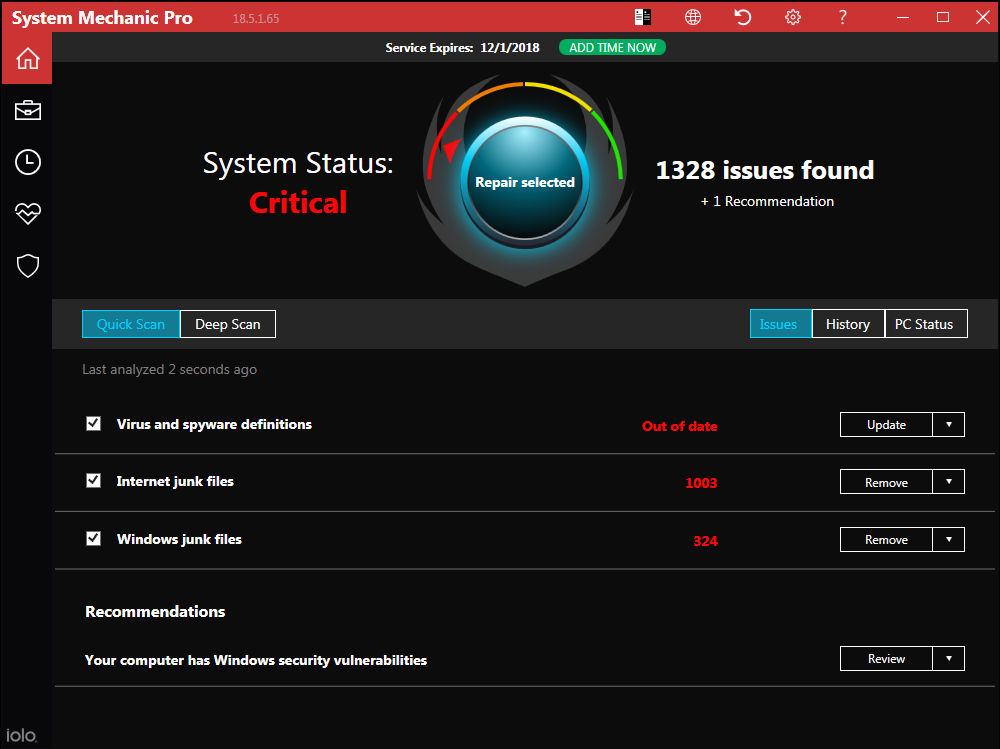


To set the color theme to classic Light, or to reset to Dark from Light, click on the left-most icon in the top, red menu bar.


System Analysis


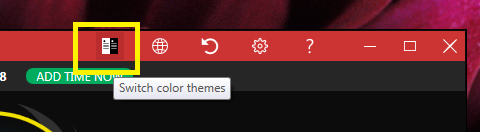
The first time you launch System Mechanic, an analysis begins.


No changes will be made to your system as a result of this analysis.


Subsequently, click Analyze Now to begin a system analysis.


After the analysis completes, you can choose to repair all of the selected items listed, or uncheck any boxes you do not wish to repair. When you are ready, click Repair selected.

Quick vs. Deep Scan
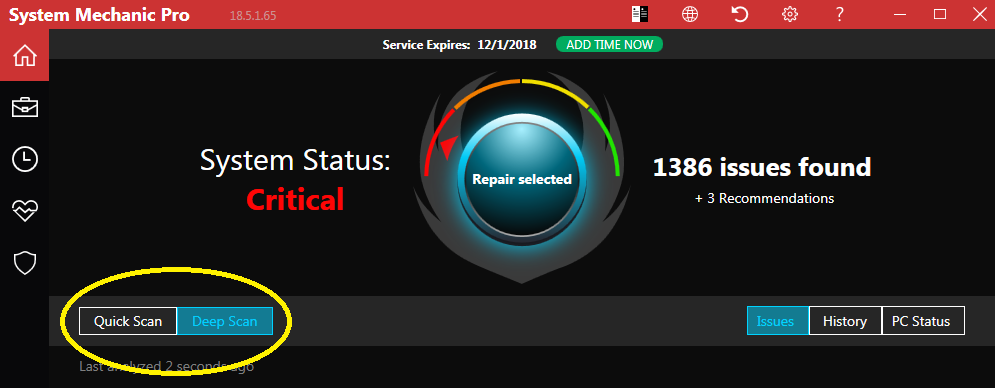

System Mechanic 18.5 now offers two scan modes: Quick Scan and Deep Scan. You may choose Deep Scan mode by clicking the Deep Scan button. A deeper system analysis will begin.


The Deep Scan option will analyze these categories:
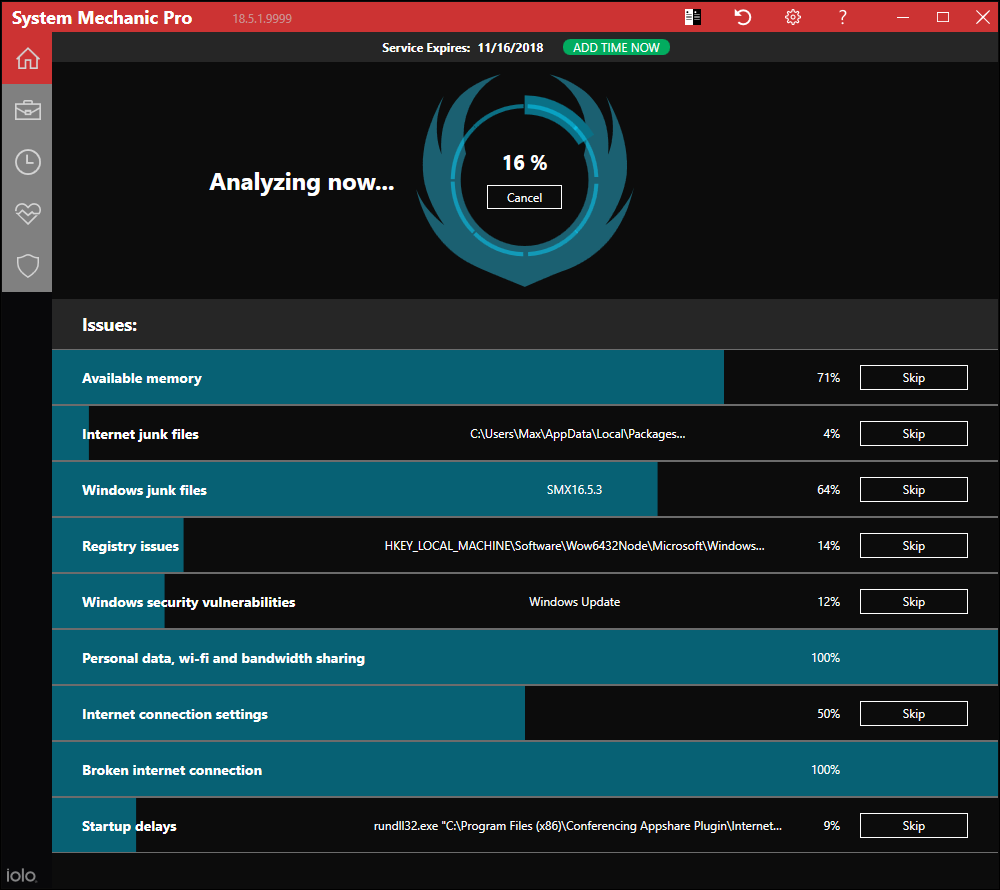


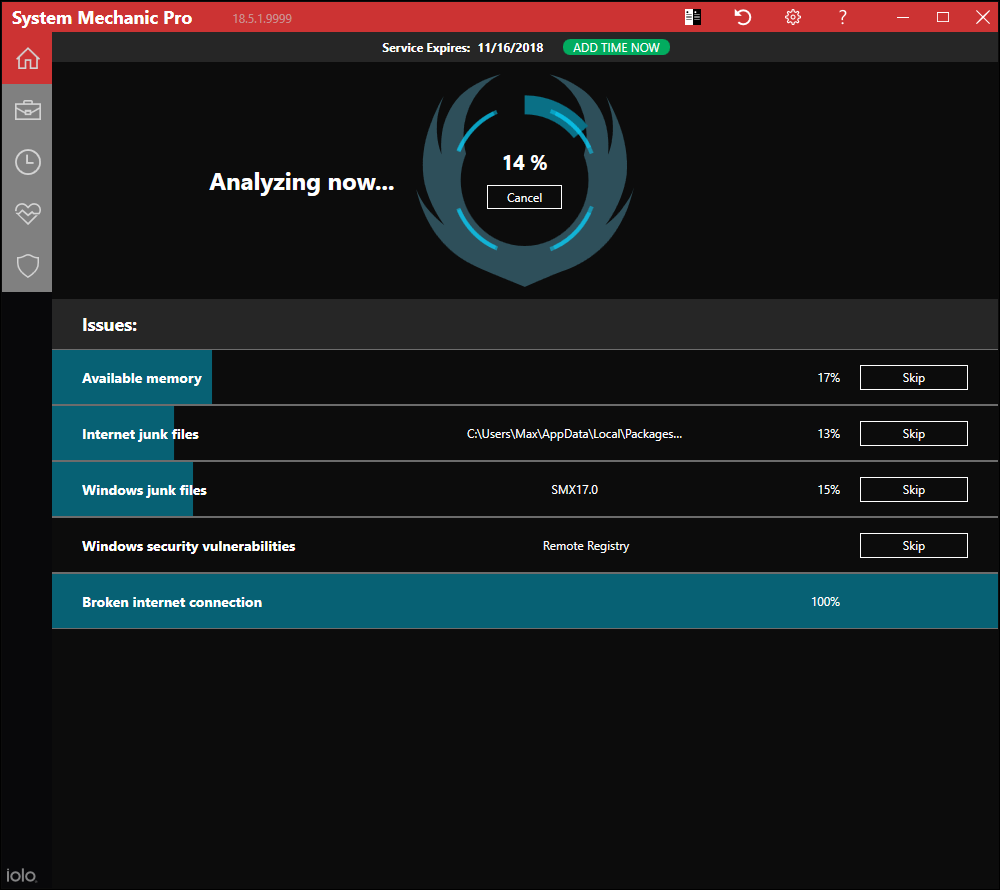
The Quick Scan will analyze these categories (a subset of the Deep Scan):


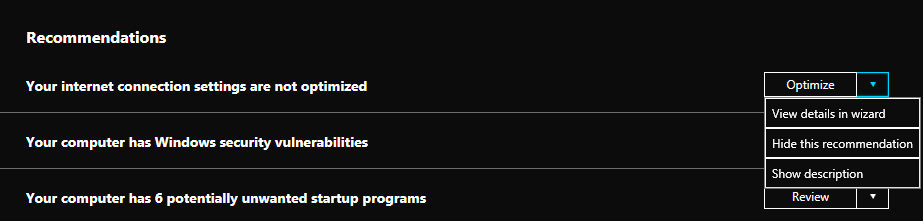
To review more details in each result, click the dropdown arrows to show current options.


Side Bar Menus

When you hover over a side bar menu item, the available options drop down.


The main Toolbox categories remain unchanged:
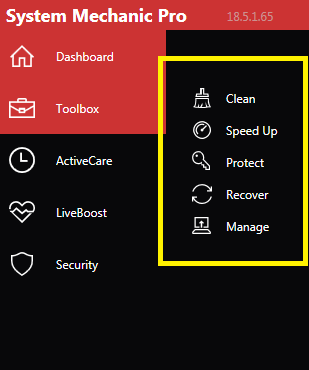


Certain screens no longer require clicking an Exit button, as now merely hovering back over and selecting a different menu item in the side bar menu allows you to navigate to anywhere within the product.


NetBooster Advanced Settings


The NetBooster Advanced Settings wizard has been enhanced to optimize broadband speed by fine tuning several settings found in Windows® 10.
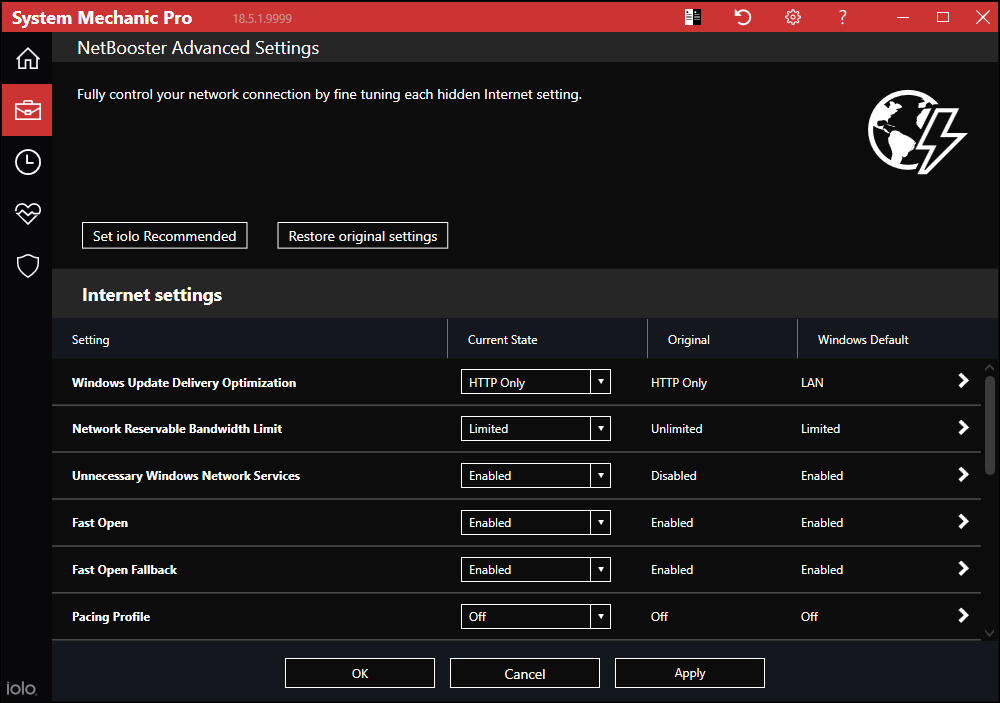


The following Windows settings and services can be disabled or adjusted in the NetBooster Advanced Settings wizard:

  • Windows Update Delivery Optimization

Enabled by default in Windows 10, Microsoft's Windows Update Delivery Optimization includes peer-to-peer technology similar to that used for torrent file sharing. When fully enabled, Windows 10 will periodically download updates and share them over the internet with other users. This Windows feature is not easily disabled in Windows 10, and can be a significant drain on network speed.

  • Network Reservable Bandwidth Limit

This Windows setting determines the percentage of bandwidth that the system can reserve. This value limits the combined bandwidth reservations of all programs running on the system. By default Windows 10 reserves 80% of the bandwidth; therefore if any system networking operation is started, all user network activities are limited to 20% of total bandwidth until the system completes the operation.

  • Unnecessary Windows Network Services

The following are optional Windows services that adversely affect network speed. All of these start automatically in Windows, and turning them off will not compromise system function:

  • Diagnostic Policy Service

  • Distributed Link Tracking Client

  • Offline Files

  • Performance Logs & Alerts

  • Program Compatibility Assistant Service

  • Secondary Logon

  • Windows Error Reporting Service

  • Windows Image Acquisition (WIA)

System Mechanic can determine which of these are enabled, and allow you to disable them all easily from the NetBooster Advanced Settings wizard.

  • Fast Open

TCP Fast Open (TFO) is an update to TCP that saves up to one full round-trip time (RTT) over the standard three-way connection handshake during a TCP session.

  • Fast Open Fallback

This is the Fallback algorithm for the TCP Fast Open (TFO) feature.

  • Pacing Profile

TCP pacing is the denomination of a set of techniques to make the pattern of packet transmission generated by the Transmission Control Protocol less bursty.


Available values:

  • Off: Never pace.

  • Initialwindow: Pace the initial congestion window.

  • Slowstart: Pace only during slow start.

  • Always: Always pace.

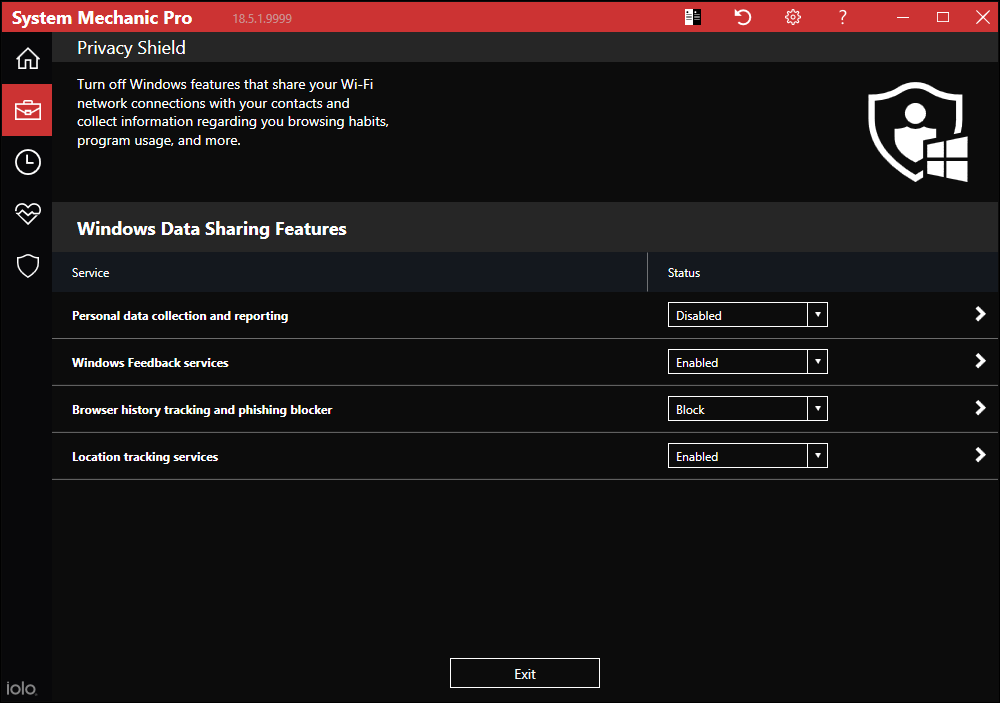
  • Privacy Shield (Windows® 10 only)

Privacy Shield was originally designed to thwart the overly-aggressive Microsoft data-collection techniques built into Windows 10, some of which are rather difficult to fully disable. The Privacy Shield wizard made it easy to do so.

Since Privacy Shield 1.0, the Windows Diagnostic and Telemetry functions are now much more aggressive and gather even more user data than when it was previously introduced. This is due to more frequent Windows 10 updating sequences because Microsoft uses the Telemetry data for fast bug fixes.


Items included in the newly re-introduced Privacy Shield 2.0 wizard have been updated to reflect current Windows 10 settings.

Available Languages


System Mechanic supports the following nine languages:

  • English

  • German

  • Spanish

  • French

  • Italian

  • Japanese

  • Korean

  • Dutch

  • Portuguese (Brazil)

Holiday Coupons For 2018/2019


Great news; from now - January 31, 2019 iolo is running a number of holiday-focused deals that should seriously spike sales volume/conversion rates.

Grab HTML code for the holiday coupons below!

Coupon Deal: Get 50% off System Mechanic 18 Pro. Coupon code: THANKS

Coupon Code: THANKS
Valid From: November 9, 2018
Valid To: December 10, 2018

<a href="https://click.linksynergy.com/fs-bin/click?id=[SITE.CODE]&offerid=258005.10000284&type=3&subid=0">Get 50% off System Mechanic 18 Pro. Coupon code: THANKS</a><img border="0" width="1" alt="" height="1" src="https://ad.linksynergy.com/fs-bin/show?id=[SITE.CODE]&bids=258005.10000284&type=3&subid=0" >


Coupon Deal: Get 50% off System Mechanic 18 [12, 15 or 18 months]. Coupon code: CYBERBLACKFRIDAY

Coupon Code: CYBERBLACKFRIDAY
Valid From: November 19, 2018
Valid To: December 6, 2018

<a href="https://click.linksynergy.com/fs-bin/click?id=[SITE.CODE]&offerid=258005.10000286&type=3&subid=0">Get 50% off System Mechanic 18 [12, 15 or 18 months]. Coupon code: CYBERBLACKFRIDAY</a><img border="0" width="1" alt="" height="1" src="https://ad.linksynergy.com/fs-bin/show?id=[SITE.CODE]&bids=258005.10000286&type=3&subid=0" >


Coupon Deal: iolo's 60% off New Year campaign. [All primary software titles eligible]. Coupon code: HAPPY2019

Coupon Code: HAPPY2019
Valid From: Dec 17, 2018
Valid To: January 31, 2019

<a href="https://click.linksynergy.com/fs-bin/click?id=[SITE.CODE]&offerid=258005.10000287&type=3&subid=0">iolo's 60% off New Year campaign. [All primary software titles eligible]. Coupon code: HAPPY2019</a><img border="0" width="1" alt="" height="1" src="https://ad.linksynergy.com/fs-bin/show?id=[SITE.CODE]&bids=258005.10000287&type=3&subid=0" >


If you have any questions/comments on the above, please email us.


Important Offers to Prioritize [Good thru 12/31/19]

Get 50% off iolo's Phoenix 360™; Total Protection, Privacy & Performance for Your Digital Life.


Get Code


<a href="https://click.linksynergy.com/fs-bin/click?id=[SITE.CODE]&offerid=258005.10000252&type=3&subid=0">Get 50% off iolo's Phoenix 360™; Total Protection, Privacy & Performance for Your Digital Life.</a><img border="0" width="1" alt="" height="1" src="https://ad.linksynergy.com/fs-bin/show?id=[SITE.CODE]&bids=258005.10000252&type=3&subid=0" >


Get the latest Search and Recover for FREE, when you purchase System Mechanic 18 for only $39.95 [normally $89.95]


Get Code


<a href="https://click.linksynergy.com/fs-bin/click?id=[SITE.CODE]&offerid=365339.10000044&type=3&subid=0" >Get the latest Search and Recover for FREE, when you purchase System Mechanic 18 for only $39.95 [normally $89.95]</a><IMG border=0 width=1 height=1 src="https://ad.linksynergy.com/fs-bin/show?id=[SITE.CODE]&bids=365339.10000044&type=3&subid=0" >


Evergreen Offers [Good thru 12/31/19]

Get DriveScrubber® 3 for only $19.95 [normally $29.95]. Save $10

Get Code


<a href="https://click.linksynergy.com/fs-bin/click?id=[SITE.CODE]&offerid=365339.10000163&type=3&subid=0" >Get DriveScrubber® 3 for only $19.95 [normally $29.95]. Save $10</a><IMG border=0 width=1 height=1 src="https://ad.linksynergy.com/fs-bin/show?id=[SITE.CODE]&bids=365339.10000163&type=3&subid=0" >


Get 50% off System Mechanic Business. Coupon code: SMB-50PT-PROMO


Get Code


<a href="https://click.linksynergy.com/fs-bin/click?id=[SITE.CODE]&offerid=365339.10000203&type=3&subid=0" >Get 50% off System Mechanic Business. Coupon code: SMB-50PT-PROMO</a><IMG border=0 width=1 height=1 src="https://ad.linksynergy.com/fs-bin/show?id=[SITE.CODE]&bids=365339.10000203&type=3&subid=0" >


Get 50% off System Mechanic 18 Pro, System Mechanic 18 or System Mechanic Business. Coupon code: AF50iolo

Get Code


<a href="https://click.linksynergy.com/fs-bin/click?id=[SITE.CODE]&offerid=365339.10000114&type=3&subid=0" >Get 50% off System Mechanic 18 Pro, System Mechanic 18 or System Mechanic Business. Coupon code: AF50iolo</a><IMG border=0 width=1 height=1 src="https://ad.linksynergy.com/fs-bin/show?id=[SITE.CODE]&bids=365339.10000114&type=3&subid=0" >


New Banner Set for System Mechanic 18.5

160x600

728x90

300x250

Click here for alternate banner sizes

Download the full banner set


Affiliate Masterclass


Google's Allowing Comments on SERPs - Let The Conspiracies Begin!


We recently came across an interesting article on AdamRiemer.me that discusses Google allowing comments on search results. (For a few niches to begin with).


At this point, it's not clear what the full implications of this development will be, but it's definitely clear that all marketers should explore opportunities, as there will certainly be many! Note. To learn more about Google allowing comments on SERPs, please check out this Google Search Help post.


"When scrolling through Twitter to see if there's anyone I had to respond too, John Henshaw from Coywolf had shared something about Google allowing comments on search results. Then Kristine Schachinger (I think it was her) linked to the webmasters post where they are indeed testing this out in a few niches. It looks like sports results are first.

The good news is more keyboard warriors have a place to vet their opinions. Because that is totally awesome and something we need more of, especially when others can view this and it can directly impact your business (eye roll and sarcasm). And we have another great side effect, scammy SEO companies who will pretend this is the all new way to do SEO and will get you to the top. It could potentially also open up the doors for affiliates to post their links or custom coupon codes that fire sales back to their accounts and directly from your trademark searches. Same goes for influencers “use my coupon and save” directly on your own search results.

This could be done on the main URL, products URLs from your own site, over other affiliates' sites and reviews third parties have created, etc… Lots of bad that could happen (and will if it takes off), but this might have some value and good sides too. I'll get to those shortly.

This post is broken out into three parts.

  1. What to expect rumor wise

  2. How it could actually impact your visibility good and bad

  3. What to do and to avoid, assuming this is something they keep

Very similar to when Google would show live twitter results in the top top positions or boost visibility if you had connections through circles in Google+, this is going to be a fun ride, if they keep it and push it out further."


To continue reading the article, please click here.


If you have any questions/comments on the above, please email us.


Over 80 Million PCs repaired

Source: NPD intellect

iolo technologies, LLC. 150 S. Los Robles Avenue, Suite 500, Pasadena, CA. 91101. USA