iolo August Newsletter


Dear [FIRST.NAME],

Welcome to the iolo affiliate newsletter for August. In the last edition of the affiliate newsletter
we introduced you to an iolo press release; "iolo Launches First Major Version Update to Phoenix 360".

In this edition of the newsletter we're going to cover the following items:

  1. Must Read iolo Knowledge-Base Article: "Using the System Mechanic Business Distribution Builder".

  2. iolo's August Affiliate Promotion: Get a Massive 60% Off Either System Mechanic 18, or System Mechanic 18 Pro.

  3. Affiliate Masterclass: "Google Ads Trademark Rules 101".

Thanks for all that you do!


Regards,
iolo technologies Affiliate Program Team
affiliates@iolo.com

Must Read iolo Knowledge-Base Article: "Using the System Mechanic Business Distribution Builder"


Please note: Feel free to use the copy below on your website/blog. [You can learn more about System Mechanic Business here].


OVERVIEW

The System Mechanic Business Distribution Builder creates an .MSI distribution file that can be used to deploy System Mechanic Business across a network. To use the builder, the system must meet the requirements found below.

System Requirements

  • Windows operating system: Windows 8 , 7, Windows Vista, or Windows XP (Service Pack 3)

  • Microsoft .NET Framework 2 or later

  • An Internet connection (required for license activation)

  • Network Connection

  • Microsoft Internet Explorer 7or later

  • At least 140 MB available hard drive space

  • 512 MB RAM (Optimal 2GB)

STEP-BY-STEP INSTRUCTIONS

Installing the System Mechanic Distribution Builder

  1. Use this link to obtain the setup package for the System Mechanic Business Distribution Builder.

  2. Extract the files to a folder, and then double-click Setup.exe to begin.

  3. Click Install System Mechanic. The System Mechanic Business Distribution Builder Setup Wizard will open.

  4. Click Next, and accept the license agreement.

  5. Continue to follow the on-screen instructions.

  6. On the final screen, click Finish to complete the installation. Note that if the Launch System Mechanic Business Distribution Builder check box is:

    • Selected, the System Mechanic Business Distribution Builder will open.

    • Cleared, the System Mechanic Business Distribution Builder will not open, but it can be opened from the installation location. The filename for the executable is SMBDistBuilder.exe

Running the System Mechanic Business Distribution Builder

Note: An Activation Key for System Mechanic Business is required. If you do not have an Activation Key, click here to purchase one.

  1. On the first screen, browse to or type in the location of the .EXE installation file for System Mechanic Business, SystemMechanic.exe. If you have a .BRND branding file to include, also select it on this screen.

  2. On the second screen, enter or paste in the System Mechanic Business Activation Key and then select or clear the program settings that will be applied when System Mechanic Business is installed on end users' machines.

  3. On the third screen, specify which ActiveCare automated tasks will run on end users' machines.

  4. On the fourth screen, enter a file name and directory for the MSI file.

  5. Click Save and the build will automatically begin. The last screen will display the build progress and then the final results of the build.

If you need to apply different System Mechanic Business configurations to different machines, build a separate MSI file for each set of configurations.


Using the System Mechanic Business MSI file

To use the MSI file to distribute System Mechanic Business over a network, you can use Group Policy. Refer to one of the following Microsoft KBA articles for instruction:

Article ID 816102:
How to use Group Policy to remotely install software in Windows Server 2003 and in Windows Server 2008

Article ID 314934:
How to use Group Policy to install software remotely in Windows 2000

Disclaimer: The links above lead to a third-party website not under the control of iolo technologies, and are provided as-is, with no guarantee of the effectiveness or reliability of the information. iolo does not guarantee that these links will be maintained or functional at any given time. Use the information above at your own discretion.


Get a massive 50% off iolo's System Mechanic Business

Get Code


<a href="https://click.linksynergy.com/fs-bin/click?id=[SITE.CODE]&offerid=365339.10000203&type=3&subid=0" >Get a massive 50% off iolo's System Mechanic Business</a><img border="0" width="1" alt="" height="1" src="https://ad.linksynergy.com/fs-bin/show?id=[SITE.CODE]&bids=365339.10000203&type=3&subid=0" >


iolo's August Affiliate Promotion: Get a Massive 60% Off Either System Mechanic 18, or System Mechanic 18 Pro. [Good thru 09/30/18]


Get a massive 60% off either System Mechanic 18, or System Mechanic 18 Pro. Coupon code: BACKTOSCHOOL


Get Code


<a href="https://click.linksynergy.com/fs-bin/click?id=[SITE.CODE]&offerid=365339.10000271&type=3&subid=0" >Get a massive 60% off either System Mechanic 18, or System Mechanic 18 Pro. Coupon code: BACKTOSCHOOL</a><img border="0" width="1" alt="" height="1" src="https://ad.linksynergy.com/fs-bin/show?id=[SITE.CODE]&bids=365339.10000271&type=3&subid=0" >


Important Offers to Prioritize [Good thru 12/31/18]

System Mechanic Business [25 Licenses / 50% Off]

Get Code


<a href="https://click.linksynergy.com/fs-bin/click?id=[SITE.CODE]&offerid=365339.10000203&type=3&subid=0" >System Mechanic Business [25 Licenses / 50% Off]</a><IMG border=0 width=1 height=1 src="https://ad.linksynergy.com/fs-bin/show?id=[SITE.CODE]&bids=365339.10000203&type=3&subid=0" >

Buy System Mechanic 18, and get System Shield for FREE. [A $39.95 value!]

Get Code


<a href="https://click.linksynergy.com/fs-bin/click?id=[SITE.CODE]&offerid=365339.10000167&type=3&subid=0" >Buy System Mechanic 18, and get System Shield for FREE. [A $39.95 value!]</a><IMG border=0 width=1 height=1 src="https://ad.linksynergy.com/fs-bin/show?id=[SITE.CODE]&bids=365339.10000167&type=3&subid=0" >

Get the latest Search and Recover for FREE, when you purchase System Mechanic 18 for only $39.95 [normally $89.95]

Get Code


<a href="https://click.linksynergy.com/fs-bin/click?id=[SITE.CODE]&offerid=365339.10000044&type=3&subid=0" >Get the latest Search and Recover for FREE, when you purchase System Mechanic 18 for only $39.95 [normally $89.95]</a><IMG border=0 width=1 height=1 src="https://ad.linksynergy.com/fs-bin/show?id=[SITE.CODE]&bids=365339.10000044&type=3&subid=0" >

Mega deal: Get 15 months of System Mechanic 18 for the price of 12. Plus get 50% off!

Get Code


<a href="https://click.linksynergy.com/fs-bin/click?id=[SITE.CODE]&offerid=365339.10000066&type=3&subid=0" >Mega deal: Get 15 months of System Mechanic 18 for the price of 12. Plus get 50% off!</a><IMG border=0 width=1 height=1 src="https://ad.linksynergy.com/fs-bin/show?id=[SITE.CODE]&bids=365339.10000066&type=3&subid=0" >

Evergreen Offers [Good thru 12/31/18]

Get DriveScrubber® 3 for only $19.95 [normally $29.95]. Save $10

Get Code


<a href="https://click.linksynergy.com/fs-bin/click?id=[SITE.CODE]&offerid=365339.10000163&type=3&subid=0" >Get DriveScrubber® 3 for only $19.95 [normally $29.95]. Save $10</a><IMG border=0 width=1 height=1 src="https://ad.linksynergy.com/fs-bin/show?id=[SITE.CODE]&bids=365339.10000163&type=3&subid=0" >

Get System Shield AntiVirus & AntiSpyware for $19.95. Save 50%!

Get Code


<a href="https://click.linksynergy.com/fs-bin/click?id=[SITE.CODE]&offerid=365339.10000132&type=3&subid=0" >Get System Shield AntiVirus & AntiSpyware for $19.95. Save 50%!</a><IMG border=0 width=1 height=1 src="https://ad.linksynergy.com/fs-bin/show?id=[SITE.CODE]&bids=365339.10000132&type=3&subid=0" >

Get Search and Recover™ 5 for only $24.95 [normally $39.95]. Save $15.00!


Get Code


<a href="https://click.linksynergy.com/fs-bin/click?id=[SITE.CODE]&offerid=365339.10000094&type=3&subid=0" >Get Search and Recover™ 5 for only $24.95 [normally $39.95]. Save $15.00!</a><IMG border=0 width=1 height=1 src="https://ad.linksynergy.com/fs-bin/show?id=[SITE.CODE]&bids=365339.10000094&type=3&subid=0" >

Spring clean your PC with System Mechanic 18 Only $29.95! [Save $20.00]. Coupon code: SPRING

Get Code


<a href="https://click.linksynergy.com/fs-bin/click?id=[SITE.CODE]&offerid=365339.10000071&type=3&subid=0" >Spring clean your PC with System Mechanic 18 Only $29.95! [Save $20.00]. Coupon code: SPRING</a><IMG border=0 width=1 height=1 src="https://ad.linksynergy.com/fs-bin/show?id=[SITE.CODE]&bids=365339.10000071&type=3&subid=0" >

Spring clean your PC with System Mechanic 18 Pro, only $34.97! [Save $34.97!] Coupon code: SPRING17

Get Code


<a href="https://click.linksynergy.com/fs-bin/click?id=[SITE.CODE]&offerid=365339.10000120&type=3&subid=0" >Spring clean your PC with System Mechanic 18 Pro, only $34.97! [Save $34.97!] Coupon code: SPRING17</a><IMG border=0 width=1 height=1 src="https://ad.linksynergy.com/fs-bin/show?id=[SITE.CODE]&bids=365339.10000120&type=3&subid=0" >

Get 50% off System Mechanic 18 Pro, System Mechanic 18 or System Mechanic Business. Coupon code: AF50iolo

Get Code


<a href="https://click.linksynergy.com/fs-bin/click?id=[SITE.CODE]&offerid=365339.10000114&type=3&subid=0" >Get 50% off System Mechanic 18 Pro, System Mechanic 18 or System Mechanic Business. Coupon code: AF50iolo</a><IMG border=0 width=1 height=1 src="https://ad.linksynergy.com/fs-bin/show?id=[SITE.CODE]&bids=365339.10000114&type=3&subid=0" >

Buy iolo Premium Services + System Mechanic 18 now!

Get Code


<a href="https://click.linksynergy.com/fs-bin/click?id=[SITE.CODE]&offerid=365339.10000146&type=3&subid=0" >Buy iolo Premium Services + System Mechanic 18 now!</a><IMG border=0 width=1 height=1 src="https://ad.linksynergy.com/fs-bin/show?id=[SITE.CODE]&bids=365339.10000146&type=3&subid=0" >

Buy iolo Premium Services + System Mechanic 18 Pro now!

Get Code


<a href="https://click.linksynergy.com/fs-bin/click?id=[SITE.CODE]&offerid=365339.10000147&type=3&subid=0" >Buy iolo Premium Services + System Mechanic 18 Pro now!</a><IMG border=0 width=1 height=1 src="https://ad.linksynergy.com/fs-bin/show?id=[SITE.CODE]&bids=365339.10000147&type=3&subid=0" >

Affiliate Masterclass


GOOGLE ADS TRADEMARK RULES 101


If you're a paid search marketer, we're guessing that at some point you have found yourself reading and re-reading Google's Advertising Policies Help page. We're also guessing you were probably even more confused than when you started reading by the time that you eventually closed the page...


Last month the Brandverity Blog did an outstanding job of explaining, and showing examples, of what is and what is not allowed according to Google's AdWords Trademark Rules.


If you're doing paid search right now, or you plan to in the near future, it's a must read piece!


Below is an excerpt of the article.


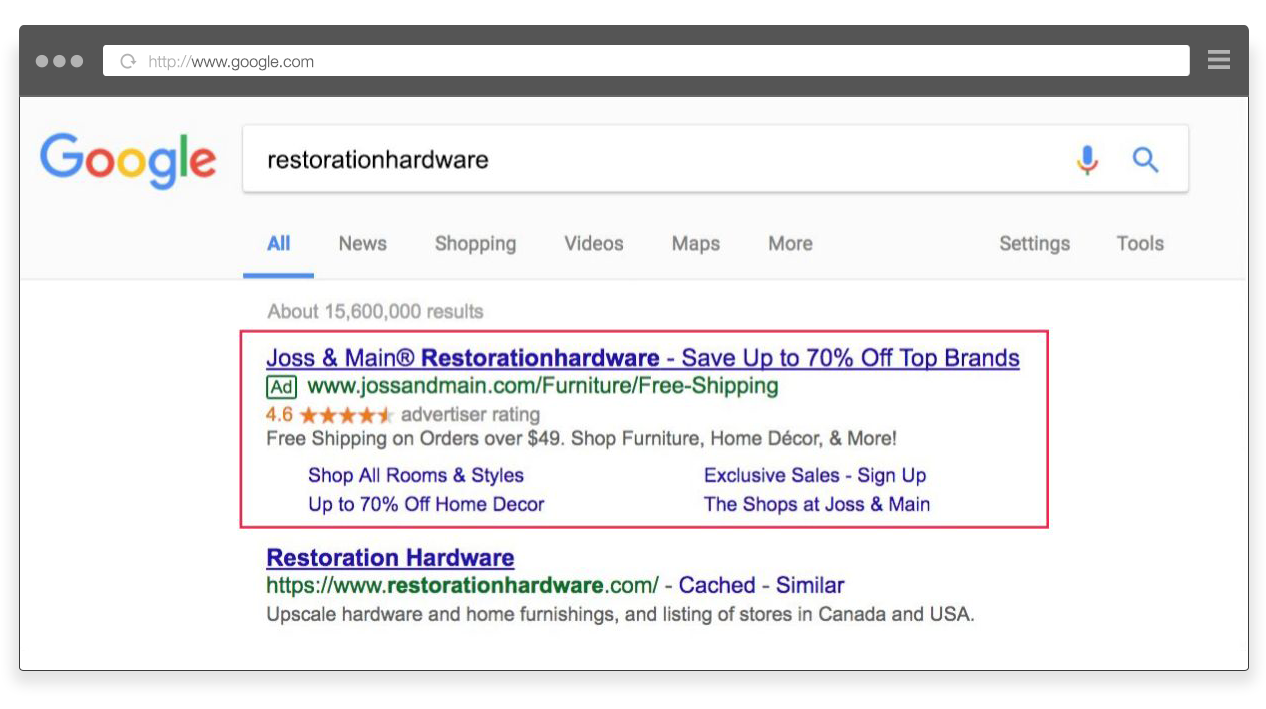
What's wrong with this picture?


It depends on who you ask. This ad likely upset Restoration Hardware. Brands tend to want to occupy position one on branded searches. Joss & Main, on the other hand, was likely happy to see that their strategy of bidding on a slight misspelling of Restoration Hardware's brand name (ie. Restorationhardware), put their ad in position one on the SERP, ahead of their competitor.

When competitors use your trademark in their Google AdWords campaigns, there are many adverse effects including decreased CTRs and increased CPCs for your ads as well as a poor customer experience for your customers. It's also annoying for any digital marketer to see a competitor in the top spot on the SERP using your trademark! Check out more in part 2 of our 4-part series on Google Ads Trademark Rules.

But, what does Google have to say about all this? Is it even allowed?

Google does not allow competitors to use trademarked terms in the ad title or ad copy. In the example above, if Restoration Hardware were to submit the ad for take down, Google would have likely removed it. You can use a brand name (or a competitor's brand name) in the display URL of your ad.

Google's rules, however, vary by geographic location and what may seem like a slight nuance can have a significant impact. This blog post �C the second in a four-part series �Cwill explain and show examples of what is and what is not allowed according to Google's AdWords Trademark Rules.

Google states that they only have one global trademark policy. In 2013, they announced, ^advertisers will need to comply with one trademark policy, rather than several, when selecting keywords for their AdWords campaigns. ̄ Since there are many notable exceptions, and those exceptions vary by geography, in reality, Google divides the world into three main groups and we will talk about each one separately:

The United States, Canada, United Kingdom, Ireland, New Zealand, and Australia. Rather than spell out all these countries each time, when we say ^the US, ̄ we are referring to this entire group of English-speaking countries.

The European Union (EU) and European Free Trade Association (EFTA) regions, referred to in this post as ^the EU. ̄

The rest of the world �C in other words, countries not covered by the two groups above.


For ads targeting the United States, Canada, United Kingdom, Ireland, New Zealand, and Australia Google's rules are as follows:


To continue reading the article, please click here.


If you have any questions/comments on the above, please email us.


Over 80 Million PCs repaired

Source: NPD intellect

iolo technologies, LLC. 150 S. Los Robles Avenue, Suite 500, Pasadena, CA. 91101. USA